
If your organisation runs on Jira, 2026 forces a decision that cannot be deferred. Not because Jira stopped working. Because three things changed at once: the hosting model, the data policy for AI, and the real bill for the environment. Companies that have to do something with their setup anyway are asking a reasonable question. If the migration is unavoidable, why migrate into the place we chose eight years ago for entirely different reasons?
This article works through it in order: why now, what exactly changes in the data policy on 17 August 2026, what monday.com is today, how an honest comparison of the two platforms looks, and how to run a migration without losing data and without stopping the teams. It closes with the practices that decide whether the new environment is in good shape a year later or inherits the same legacy in a newer interface.
1. Why 2026 is the year to look at alternatives to Jira
A short history of one decision
Large organisations, particularly in banking, insurance, manufacturing and the public sector, chose Jira for a specific reason. It offered an on-premise deployment. Data stayed on their own servers, which often followed directly from contracts with their own clients or from regulatory requirements. It was an argument that cloud-only tools could not counter.
That argument no longer holds. Atlassian spent several years moving product development, new features and the pricing model towards cloud, and in September 2025 published the schedule for winding down the entire Data Center line.
The hard dates
The dates below come from Atlassian's own schedule at atlassian.com/migration.
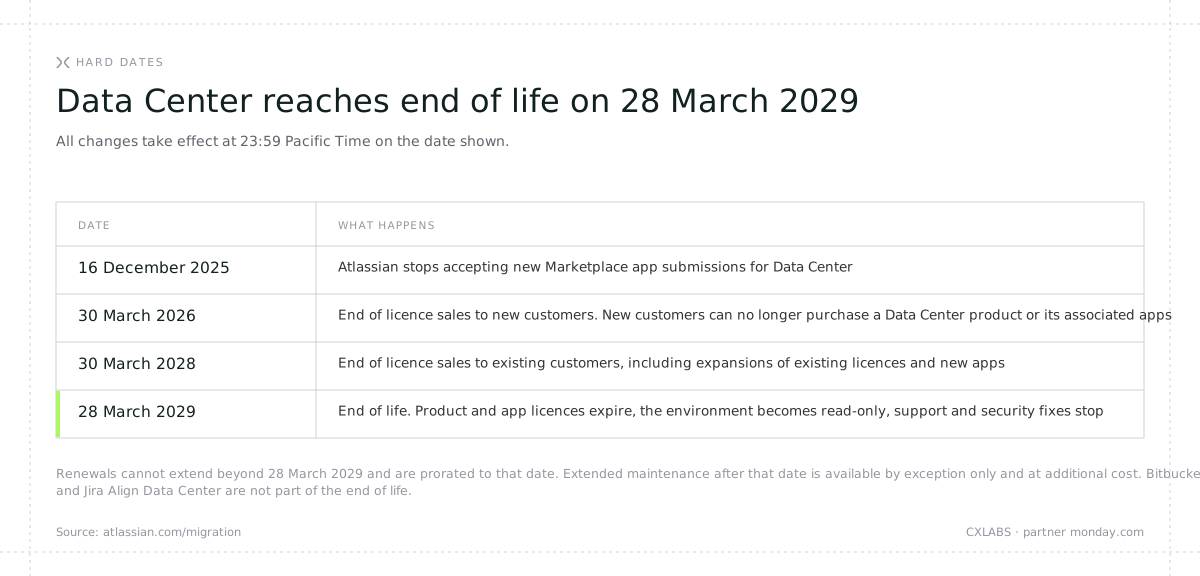
Three details get lost in most write-ups and each of them has a real effect on budget planning.
Renewals are available, but they cannot extend the life of the environment. After 30 March 2026 an existing customer can still renew, but the renewal cannot reach beyond 28 March 2029. A twelve-month renewal purchased after March 2028 will be prorated down to that date.
Extended support after 2029 exists, but it is not a line on a price list. Atlassian allows extended maintenance for selected Data Center customers after 28 March 2029, at additional cost and by exception only, agreed with your account executive. Building an IT strategy on the assumption that the exception will be granted is a risk, not a plan.
Not everything is included. The end of life covers Jira Software Data Center, Jira Service Management Data Center, Confluence Data Center, Bamboo, Crowd, Data Center mobile apps and Marketplace apps for Data Center. Two things sit outside it: Bitbucket Data Center, which instead of being retired gets a new licence covering both Data Center and Cloud, and Jira Align Data Center. So if you keep source code in Bitbucket on your own infrastructure, that particular part of the stack does not force your hand. The rest does.
The practical conclusion: the deadline is 28 March 2029 and it does not move depending on when you start. For an instance measured in hundreds of projects and hundreds of thousands of issues that is not a lot of time. A realistic migration project at that scale, including the stabilisation period, takes six to twelve months. Starting in 2028 means working without a buffer, on an environment that stops receiving security fixes during the project.
The bill nobody talks about
The price of a Jira licence is not the price of a Jira environment. In large, long-lived instances the real cost is the licence plus a set of paid add-ons without which the work is either uncomfortable or impossible: Advanced Roadmaps for portfolio planning, Tempo for time tracking, Structure for hierarchy, ScriptRunner for automation beyond the standard. In the audits we run, the licence cost of that set alone in an organisation of several thousand users reaches the tens of thousands of euros per year, on top of the Jira licences themselves and on top of infrastructure upkeep and an administrator's time.
Then there is the expense that appears in no annual financial plan: the migration to cloud itself. That cost has to be absorbed either way.
We deliberately do not publish monday.com pricing here. Comparing list prices leads to wrong conclusions, because they depend on the plan, the number of people, and how many functions you currently buy separately. The only comparison that means anything is between complete bills: on one side the licence plus add-ons plus infrastructure upkeep plus administrator time, on the other a single subscription with portfolio, time tracking and reporting included as standard. In the comparisons we prepare for clients the difference in total cost is often several times over, but there is no single number that would be true for everyone. Which is why this is a conversation over real data, not a paragraph in a blog post.
The schedule and the bill are two changes you can put in a spreadsheet. The third is harder, because it is not about cost but about control. It deserves its own section.
2. Data and AI: the change of 17 August 2026
What actually changes
This change also affects companies already running Jira Cloud, and it is probably the most frequently misrepresented topic in the entire discussion about Atlassian. We describe it exactly as it reads in Atlassian's official FAQ, without sharpening it and without smoothing it over. At the end of this section there is a checklist of things to verify in the admin panel. Settings can be changed at any time, so it stays relevant whichever side of that date you are reading this on.
From 17 August 2026 Atlassian uses customer data to improve products and experiences for all customers. That is the change: previously the same data served to improve the experience within a single organisation only, now it feeds product development across the whole base. The updated Customer Agreement, AI Terms, Data Processing Addendum and Privacy Policy take effect on the same date.
The data falls into two categories:
- Metadata: characteristics of content and patterns common across customers. Content attributes, meaning statistical characteristics, numeric fields and derivatives of in-app data, for example the number of story points on a Jira work item or the complexity of a Confluence page. Plus common patterns: phrases, keywords and topics extracted from search queries, Rovo conversations and configuration data, with rare data that might be unique to one organisation omitted.
- In-app data: content created by users. Confluence page titles and bodies, Jira work item titles, descriptions and comments, custom status, workflow and emoji names.
Defaults depend on the plan and this is the detail that matters
This is where most write-ups get it wrong, including those published by Atlassian's competitors. The defaults are not the same for everyone and not everything is on by default.
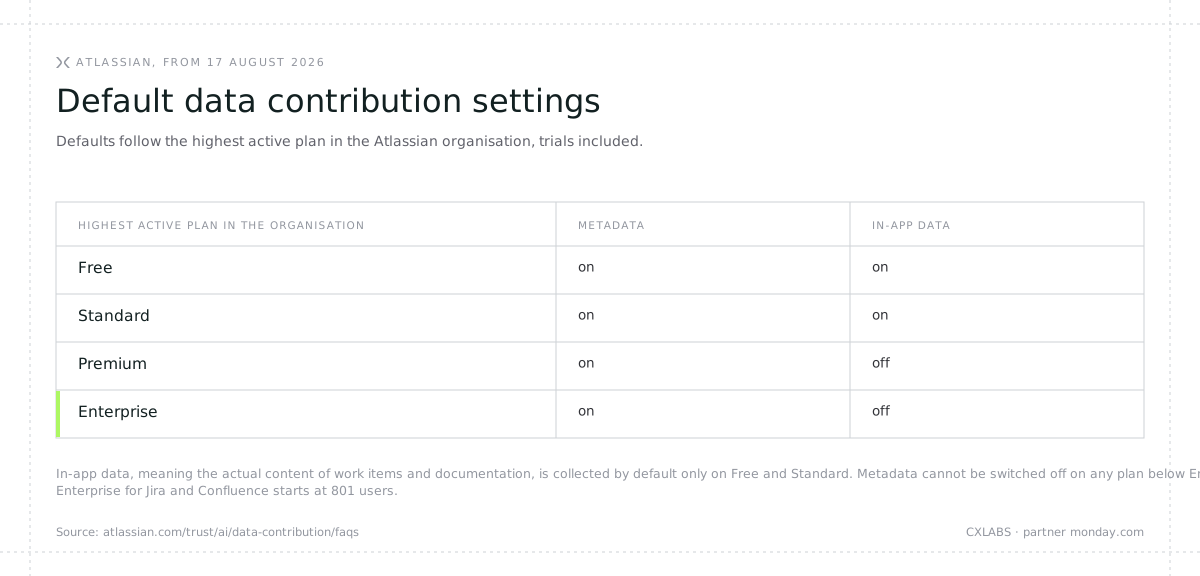
Two conclusions follow. First: in-app data, meaning the actual content of work items and documentation, is collected by default only on Free and Standard. On Premium and Enterprise it is off by default, and every customer can switch it on or off. Second: metadata cannot be opted out of on any plan other than Enterprise.
And here is the part that is hard to work around. The Cloud Enterprise plan for Jira and Confluence starts at 801 users (201 for Jira Service Management). An organisation below that threshold has no technical means of declining metadata contribution, because it has no access to the plan that allows it. Control over that category of data is therefore a function of purchase size, not an administrator's decision.
Someone will point out at this stage that monday.com also gates EU data residency behind Enterprise, so what is the difference. The difference lies in what exactly sits behind the threshold. With monday.com it is the physical location of the servers. The commitment itself, that customer data and content are not used to train models and that model providers operate under Zero Data Retention, does not depend on the plan and applies to every customer, including Free. In the other case what sits behind the threshold is the ability to have your data left alone. Those are two different classes of limitation and they are worth separating rather than lumping together.
The mechanics that catch people out
The highest active plan in the organisation decides, trials included. If one Atlassian organisation holds Jira Standard and Confluence Premium, the whole organisation follows the Premium settings. A trial counts as an active plan.
Every organisation separately. If a company runs several Atlassian organisations, the settings have to be reviewed and set in each one independently. That is a real scenario in corporate groups and after acquisitions.
A downgrade switches metadata back on. If you hold Enterprise with metadata contribution turned off and move to a plan that does not offer that option, metadata contribution is turned on. Atlassian notifies you and gives 30 days to review, but the direction of the change is automatic.
A Cloud Migration Trial is in scope. This one matters directly to anyone planning a move off Data Center. Data in the cloud organisation during a migration trial is subject to data contribution settings based on the highest active plan. Data in the Data Center products themselves is not covered by this change.
The initial scope is not the whole stack. The settings initially cover Jira, Confluence and Jira Service Management along with the Atlassian Platform apps (Rovo, Home, Teams, Projects, Assets, Goals, Analytics, Administration) and selected Teamwork Graph connectors. Loom, Trello, Bitbucket and Marketplace apps do not yet have those settings, and Atlassian states that where no settings exist, no data is contributed. Data from one app can, however, be used to improve another: insights from how teams use Jira may improve the experience in Confluence.
Some organisations are excluded entirely. Customers using customer-managed keys (CMK/BYOK), Atlassian Government Cloud, Atlassian Isolated Cloud, and organisations with HIPAA requirements are excluded from data contribution. So are government entities and certain financial services customers. Educational institutions, including publicly run ones, are included under the general rules.
What Atlassian commits to on its side
Fairness requires stating the safeguards the vendor describes as well. All contributed data is de-identified and aggregated before use, with information that directly identifies individuals removed and controls applied against re-identification. Data residency settings remain in effect. The data is not sold and is not shared with third-party model providers for training their own services. After an opt-out, in-app data is removed from the training sets within 30 days and metadata within 90 days, and models trained on that data are retrained.
Why this is a decision point, not trivia
For a CISO the question is whether control over a category of data should depend on an 801-user threshold. For a data protection officer it is a question of the lawful basis for processing and of whether a change in the vendor's terms triggers an obligation to reassess risk. In practice it does: a material change in a technology provider's data handling is a standard trigger for review in any competent vendor management process, and in financial services additionally under DORA.
For the board the question is simpler. Should incident write-ups, the content of customer requests, process configurations and architecture documentation feed a vendor's product development, under a model where opting out of part of that data is a function of the plan you hold?
This is not an argument that you have to leave. It is an argument that the decision has to be made deliberately, documented, and made in full knowledge of the alternative.
Five things to check in the Atlassian admin panel
These five are worth ticking off regardless of whether you are considering a change of platform, and regardless of when you are reading this. Settings can be changed at any time, and a downgrade can reset them without your involvement.
- Check the highest active plan in every organisation. Atlassian Administration, the Apps section, then Atlassian apps. Remember trials.
- Review the data contribution settings. Atlassian Administration, the Security section, then Data contribution. The permission sits with an organisation admin, not a Jira administrator.
- Make a decision on in-app data. On Premium and Enterprise it is off by default. On Free and Standard it is on, and anyone can switch it off.
- Document the decision for your DPO and vendor management. Date of review, who decided, on what basis, which settings apply in which organisation. Without that, the review gets done a second time, during an audit, under time pressure.
- Check whether you are in an excluded category. CMK/BYOK, Government Cloud, Isolated Cloud, HIPAA. If you are, the settings will be off and cannot be turned on. That is a deliberate safeguard, but it is still worth seeing in the panel.
Since you are sitting down to this review anyway, it is the best possible moment to ask the second question: how does the same issue look on the other side. A commitment that does not depend on the plan is easier to defend in front of an auditor than a setting somebody has to remember to toggle.
Three changes, one consequence: in 2026 "we stay with what we have" stopped being the zero-cost, zero-risk option. The environment has to be rebuilt either way, the budget leaves the account either way, and the platform decision will be made before March 2029 regardless. The only question is whether you move those processes to a place that ends in the same bill and the same data policy, or to one where the whole organisation works on a single platform.
3. What monday.com is in 2026
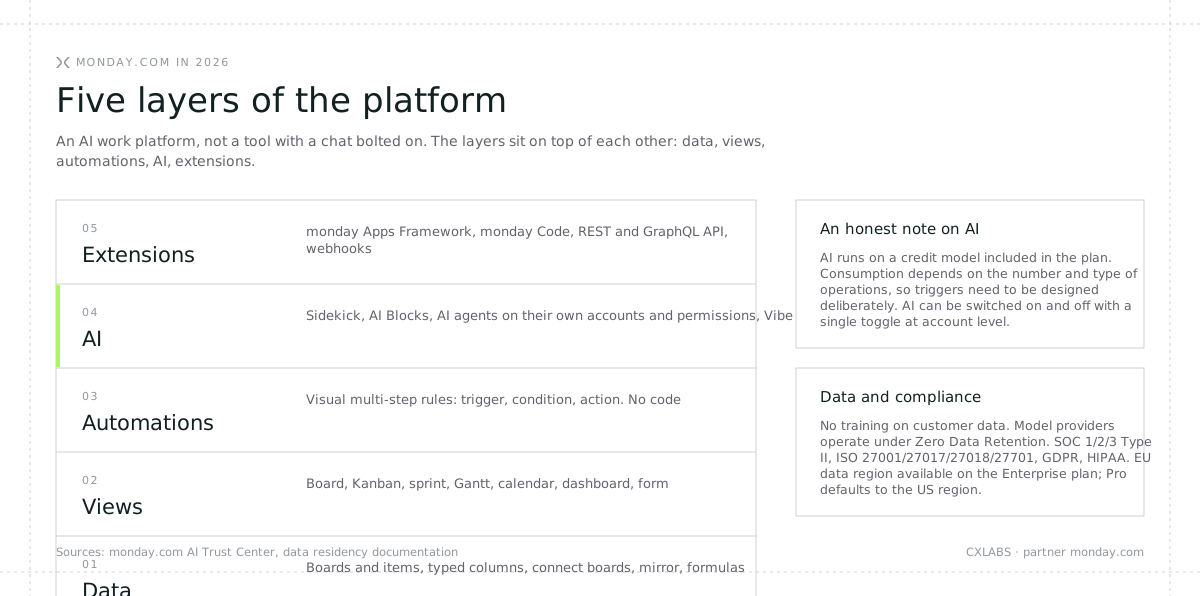
The biggest misconception in conversations about monday.com is an image from 2019: colourful tables for the marketing team. The platform we are describing is something else, and the difference is easiest to show through its layers.
The data layer
The foundation is a relational structure of boards and items with typed columns. Items link across boards (connect boards), values can be pulled from linked boards (mirror columns) and calculated with formulas. In practice one work item can be visible at the same time in a team's backlog, in a portfolio view for the PMO and in a report for the board, without copying data and without exporting to a spreadsheet.
The views layer
The same data supports different perspectives: board, Kanban, sprint, Gantt, calendar, chart, form, dashboard. Changing the view is not a configuration change and does not require an administrator. That sounds trivial until you compare it with "ask the admin for a new filter and a new view".
The automations layer
Rules are built visually, in a trigger plus condition plus action pattern, with support for multi-step flows. In migration audits we see a repeatable pattern: around 60% of ScriptRunner scripts are simple "when A, do B" rules that map one to one onto native automations, and another 20% are calculated fields and aggregations that formula and mirror columns replace.
The AI layer
This is the part that genuinely changed the platform over the last two years and the part that justifies the name AI work platform:
- Sidekick is an assistant that works in the context of your account data. It answers questions about project status, builds automations and dashboards, summarises progress. It can manage automations, meaning create, read, disable and delete them.
- AI Blocks are ready-made AI operations dropped straight into a column or an automation: categorisation, data extraction, translation, summarisation, sentiment scoring.
- AI agents are autonomous units performing multi-step tasks within a defined scope. In March 2026 monday.com released infrastructure in which an agent acting on behalf of a person signs up, authenticates and works on the platform under its own account, with its own permissions and its own audit trail.
- Vibe is for building simple apps, views and calculators without code, inside the platform.
A sensible way to think about it: not "a tool with a chat bolted on", but a work environment in which a team of people and a team of agents work on the same data under the same rules.
The extensions layer
For teams that extended Jira with plugins there is monday Apps Framework, monday Code, REST and GraphQL APIs and webhooks. Extensions that cannot be built natively are built as apps on the platform rather than alongside it.
Two things worth saying plainly
First, AI on monday.com runs on a credit model. The credit pool is included in the plan and consumption depends on the number and type of operations. So it is not a "free and unlimited" feature, and automations that use AI need to be costed. The good news: AI is switched on and off with a single toggle at account level, so an organisation can start with AI off and turn it on when governance is ready.
Second, data location. monday.com does not use customer content or data to train models and does not permit third parties to do so. Models run through managed APIs from cloud providers (AWS Bedrock, Azure) under Zero Data Retention, meaning the model provider does not store inputs or outputs. Data is encrypted in transit (TLS 1.3) and at rest (AES-256). The platform holds SOC 1/2/3 Type II certifications and ISO 27001, 27017, 27018 and 27701, with GDPR and HIPAA compliance. Hosting in the EU data region (Germany, AWS infrastructure) is available on the Enterprise plan. On the Pro plan data sits in the US region by default. If EU residency is a requirement, plan for it from the start, at the point of choosing the plan, rather than discovering it halfway through the rollout.
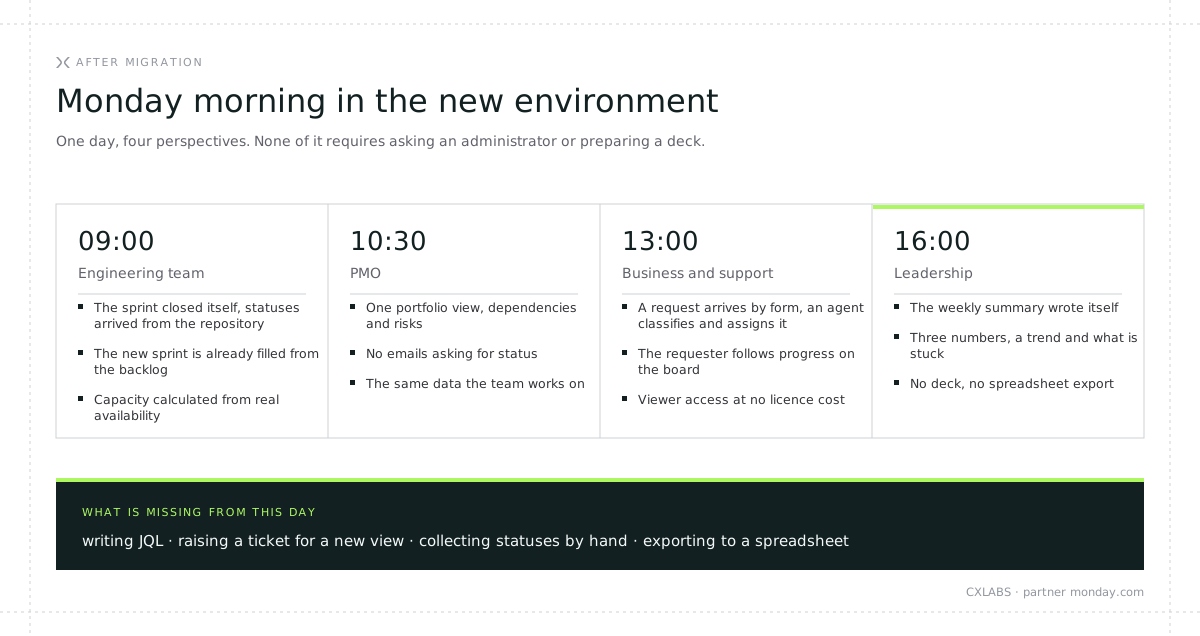
Monday morning in the new environment
Architecture is one thing, daily work is another. Here is what the first day of the week looks like in an organisation that has completed the migration, described from four different perspectives.
09:00, engineering team. The sprint closed itself. Work item statuses moved to done because they arrived from the repository along with the merge, nobody clicked through the board on Friday evening. The new sprint is already filled from the backlog, and team load is visible on a single chart because capacity is calculated from real availability rather than from the scrum master's memory.
10:30, PMO. One portfolio view, all projects, the dependencies between them and risks flagged where deadlines overlap. No emails asking for status, no gathering data into a spreadsheet before the Monday review. The data is the same data the team uses, so there is no "version for the board" and no "real version".
13:00, marketing and customer support. A customer request arrives through a form, an AI agent classifies it and assigns it to the right team, and the person who raised it follows progress on the board. At no licence cost, because viewer access is free. Without asking anyone in IT for permissions.
16:00, leadership. The weekly summary is ready because it wrote itself: three numbers, a trend, and a list of what is stuck. Nobody prepared a deck, nobody wrote a query, nobody exported to a spreadsheet.
What is missing from that day: writing JQL, raising a ticket with an administrator for a new view, collecting statuses by hand, and exporting to a spreadsheet. Those are not features on a price list. They are the effect of everyone working on one platform while automations and agents handle the repetitive work.
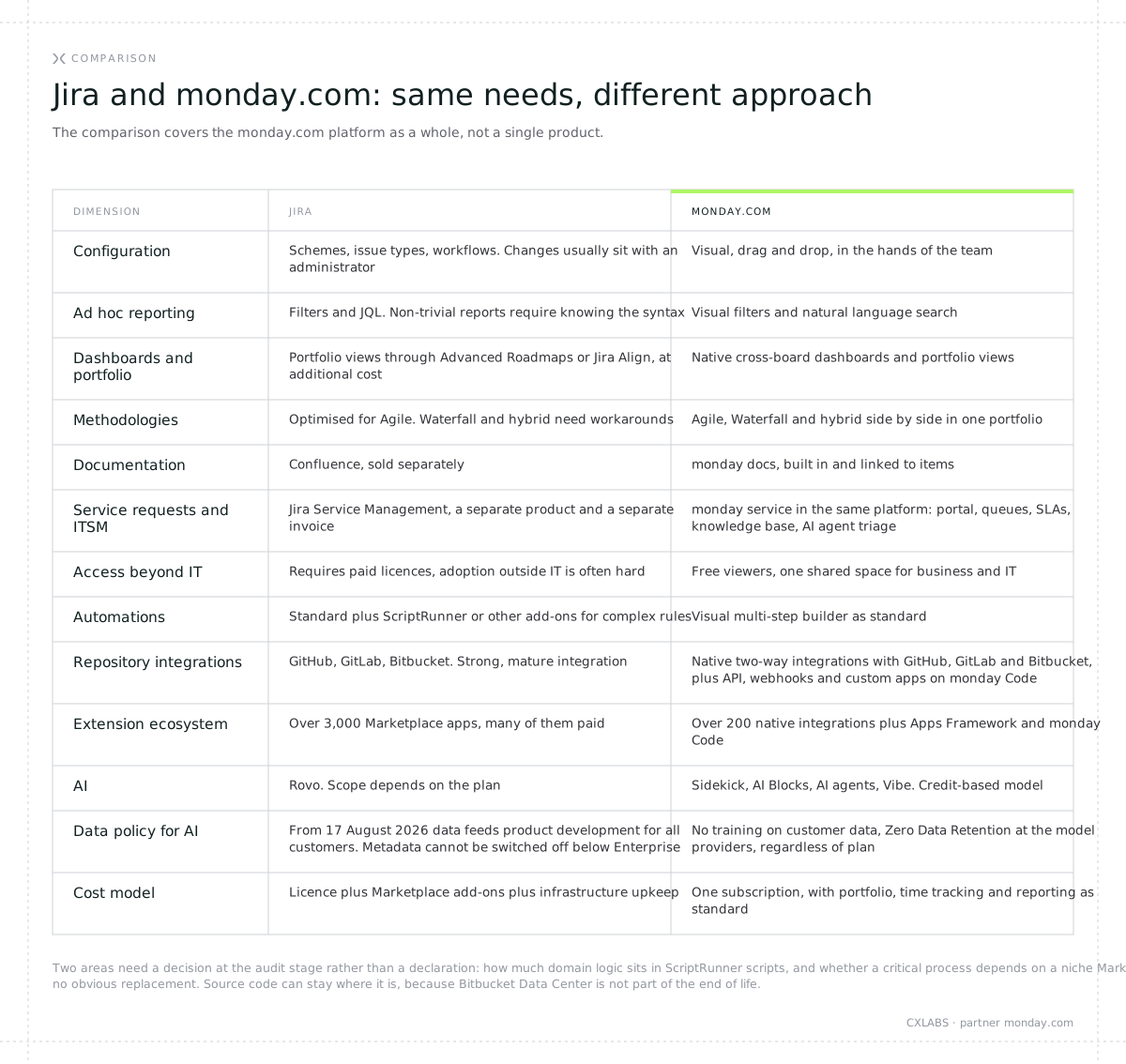
4. Jira and monday.com: an honest comparison
The comparison below covers the monday.com platform as a whole rather than a single product. That is deliberate. The biggest difference between these two environments is not which one handles a sprint better, but that one is a tool for the IT department and the other is a work environment for the whole organisation.
Two questions to answer before deciding
Not every element of a Jira environment has an equivalent available on day one, and there is no point hiding that. Our audits consistently surface two areas that need a decision rather than a declaration.
How much logic sits in scripts. Organisations that built domain logic in ScriptRunner running to thousands of lines of code will find a native equivalent for most rules. Around 10% of cases are not a migration but a redesign: as an app on monday Code or as an intermediate layer. That is a line in the quote, not a surprise.
Whether a process depends on a niche add-on. Three thousand Marketplace apps are three thousand Marketplace apps. If a critical process rests on one of them with no obvious replacement, we check it during the audit and price it, rather than discovering it mid-transfer. The same applies to the scope of native repository integrations: the available scope depends on the plan, so we confirm it before promising anything.
The other areas that were still an argument for staying two years ago now have an answer. Service requests and support processes are monday service, a full ticketing system inside the same platform rather than a separately purchased product. Documentation is monday docs, linked to items rather than living in a separate tool. Portfolio management, time tracking and reporting are standard rather than paid add-ons. And source code can stay where it is: Bitbucket Data Center is not part of the end of life and its customers get a licence covering both Data Center and Cloud, so a hybrid model is a genuine option rather than a compromise.
Who this pays off for fastest
Our practice points to a fairly consistent profile of the organisation where the change delivers within the first months rather than in year two.
The environment runs on Data Center, so a rebuild is on the roadmap anyway. More than half the people working in the tool are not developers, yet everyone works in a tool built for developers. The bill includes Marketplace add-ons for functions that are standard in a newer platform. Reports for the board are produced by hand or through spreadsheet exports, and visibility into a project begins the moment somebody prepares a deck. Data and AI policy has entered the conversation with compliance.
The more of that sounds familiar, the faster the change pays for itself. If, on the other hand, you work in a narrow, purely engineering team, have no issue with the bill, and nobody outside IT needs visibility into this data, you can comfortably stay longer. The honest answer in that case is: run the numbers again in 2028.
Evidence, not claims
Vistra. A global provider of essential business services present in over 50 countries, more than 10,000 employees, serving 30% of the Fortune 500. Its engineering team moved from a chaotic, Jira-based intake process to a centralised monday.com environment. Results: 28% faster time to market, full transparency of engineering processes for business and commercial teams, and a structured 75/25 split of team time between the strategic roadmap and support and bugs.
Canva. The Growth Marketing Creative team was taking requests through three different tools, Jira among them. After moving to a single monday.com environment: 40% faster project delivery, over 60,000 ads produced (a threefold increase in creative output), expansion from 9 to 56 markets, and 657 manual administrative steps eliminated.
Note what both cases have in common. Neither migration happened because Jira could not handle work items. Both happened because the tool did not connect the technical team with the rest of the organisation.
5. The migration plan
The three most common causes of failed migrations
Migrations at this scale rarely fail on technology. Data transfer is an engineering problem with a known solution. They fail on three decisions taken at the start of the project.
Mistake one: recreating the old environment one to one. "Let's build Jira inside monday so the team does not feel the change." In a long-lived Jira instance a large share of custom fields is not genuinely used, and a significant share of processes are remnants of procedures that stopped applying years ago. A migration is the only chance in a multi-year cycle to cut that. Without that decision the new environment inherits the same legacy configuration in a newer interface, and the organisation spends its budget on relocation instead of on putting its processes in order.
Mistake two: running two systems indefinitely. "Let's keep Jira for six months in case something goes wrong." Nobody maintains two systems with discipline. After three months the data drifts, part of the team works here and part there, and the company pays two licence invoices. The standard is a structured wind-down: controlled two-way sync while teams are being moved, then a hard cut-over, then Jira in read-only mode as a stabilisation buffer for one to two months, then decommissioning.
Mistake three: no pilot. "Let's move everyone at the end of the quarter." A pilot team of five to ten people validates the architecture on real data and with real people. It catches the problems that looked sensible on a design workshop whiteboard. Without a pilot, the first migration wave becomes the pilot, only with a great many more witnesses.
Four phases that work at any scale
Phase 1. Audit and decisions (one to three weeks)
An inventory of projects, fields, processes, automations, scripts and Marketplace apps. We answer the question of what is genuinely used and what is legacy. Every script and app goes into one of four categories:
- native automation or workflow (around 60% of cases in a typical instance),
- native formulas and mirror columns, meaning calculated fields, aggregations, SLA monitoring (around 20%),
- an AI agent, where a decision or classification is involved, for example request triage or status aggregation (around 10%),
- a dedicated app or an intermediate layer (around 10%).
This phase also settles three things that cannot be decided later: the permissions architecture, the technical method of data transfer, and the scope of AI agent use, with a governance decision attached.
Phase 2. Target configuration and mapping (two to four weeks)
Workspace structure, templates for project types, status conventions, and the Jira to monday.com terminology map. Corporate sign-on connected (SSO, SCIM, directory). Repository and CI/CD integrations configured. Dashboards built for each audience: team, PMO, leadership, compliance.
The terminology map looks like this:
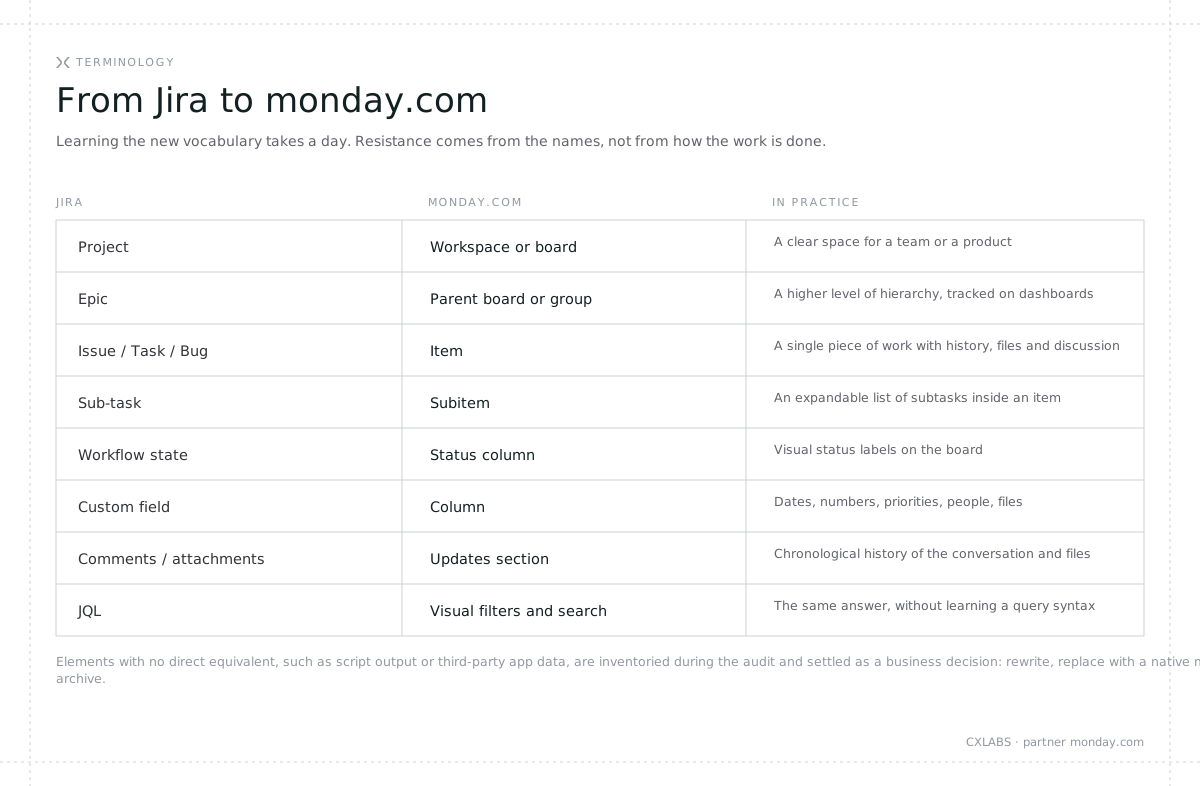
Elements with no direct equivalent, such as script output or third-party app data, are inventoried during the audit and settled as a business decision: rewrite, replace with a native mechanism, or archive.
Phase 3. Pilot and transfer (two to eight weeks, depending on scale)
A pilot on archived projects, to test the approach on data that does not affect continuity of work. After the pilot we update the plan and the mapping. Only then do active projects transfer, in batches, with validation after each batch. While teams are being moved, two-way sync is running: teams not yet moved work in Jira, teams already moved work in monday.com, and fields on new items stay consistent on both sides.
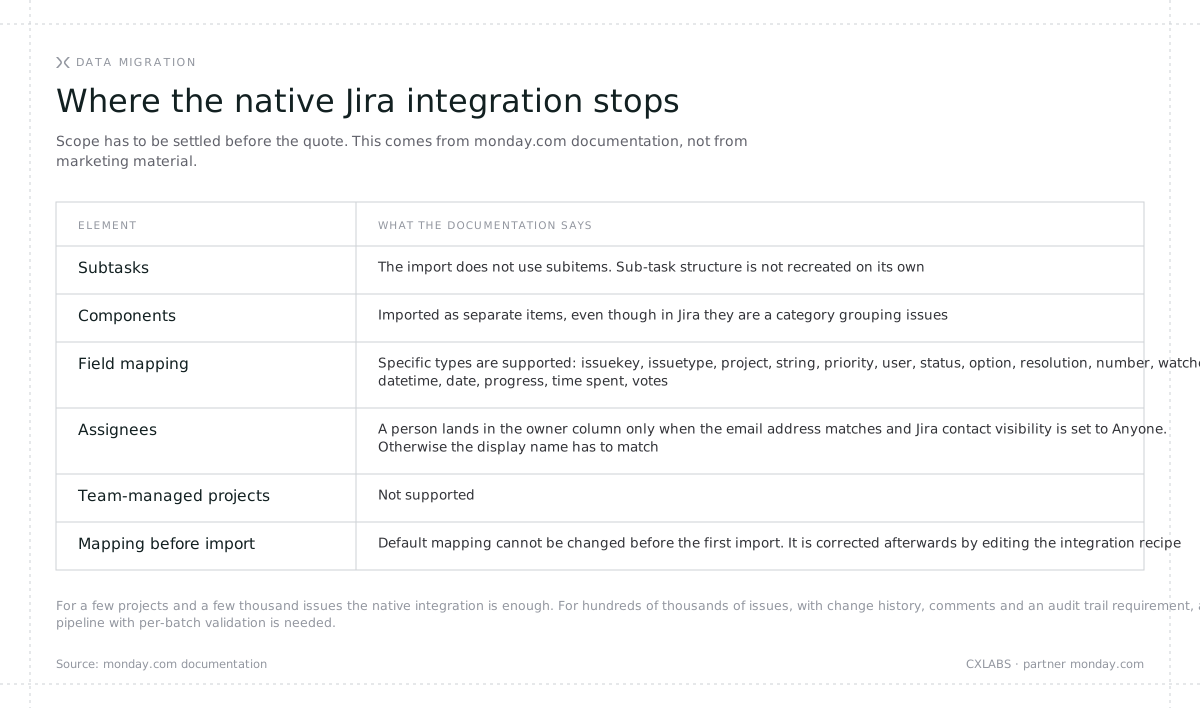
We match the transfer tooling to the scale. For a team with a few projects and a few thousand issues the native monday.com integration with Jira is enough: you configure it on the target board, tag batches of issues with a trigger label, and the items come across into monday.com. The integration is available from the Standard plan.
At hundreds of thousands of issues, with change history, comments, attachments and a sub-task hierarchy, we add a dedicated pipeline: transfer in batches, validation after each batch, retry logic, and the discrepancy report that compliance requires. The exact split between what comes across natively and what needs a dedicated mechanism is written up during the audit and shown in a separate migration guide, before the quote. Nobody should sign a contract without that list in front of them.
Phase 4. Cut-over, training and care
A hard cut-over date, communicated early. Train-the-trainer sessions for key users, with materials available to everyone. A few days of intensive support immediately after the switch, on a dedicated channel. Jira in read-only mode as an archive for the duration of the stabilisation buffer, then decommissioned.
Once the migration closes, the part most often left out of plans begins: care. The first months of real use reveal which parts of the configuration need adjustment. That is normal and it needs budget and consultant time, in a monthly retainer with a review on the PMO side.

The order of these four phases is non-negotiable and it is the one thing in the whole plan we do not change under deadline pressure. The audit can be shortened, the pilot can be narrowed to two projects, the transfer can be split across more batches. What cannot happen is skipping the pilot and going straight into active projects, because then the first migration wave becomes the pilot, in production. Nor can the transfer begin without a settled permissions architecture, because permissions are written once at the end and corrected afterwards on a live environment, with people already working in it.
How long it takes and what drives it
Project duration is set by five variables and none of them is the number of users, even though that is where everyone starts. The number of genuinely used projects counts, because each one requires a mapping decision. The volume of issues and attachments counts, because it determines whether the native integration is enough or a dedicated pipeline is needed. The number of automations and scripts counts, because each one goes into one of the four migration paths. The number of teams to onboard counts, because training and moving happen in waves rather than as a single event. And the availability of people on the client side counts, because that is the most common reason schedules slip.
The number of users is only a proxy in all of this, but a convenient one, because it usually correlates with the rest. Which is why the ranges below are a starting point for a conversation rather than a quote.

Two conditions on top of that do not depend on the vendor. Without an executive sponsor at CIO or CTO level the migration stalls at the first serious pushback, and pushback arrives at the latest at the moment somebody has to be told that a custom field their team has used for years is not coming across. Without a dedicated PMO on the client side, even at part capacity, decisions drag and the schedule slips, because a migration at this scale involves dozens of decisions and each one blocks the next step.
At the largest scale the plan spreads across twelve months and looks like the timeline below. Four months are migration and configuration work, the next two are a stabilisation buffer, and the remaining eight are care, during which the environment matures alongside the teams.
Note two things. Jira is not switched off at cut-over, it moves to read-only for two months so that data integrity can be verified and archived configuration can be inspected when needed. The second is the licence window: licences in the new environment are activated sequentially, following the order in which teams are moved, rather than all on day one. That determines how long the company pays for two environments in parallel, and it is one of the few items in this project that can genuinely be optimised without affecting quality.
At smaller scale the same arrangement compresses without changing shape. Three weeks instead of four months of migration, two weeks of read-only instead of two months of buffer, a quarter of care instead of eight months. The proportions between stages stay the same, because they follow from how people absorb a new environment rather than from data volume.

What not to do with the schedule
Do not plan the cut-over in the fourth quarter or ahead of a major business release. Do not plan the end of the migration for the moment the licence expires, because then every delay becomes a crisis. And plan the licence window: the order of licence activation in the new environment should follow the order in which teams are moved, to shorten the period when the company pays for both environments.
Who sits on the other side of a project like this
An enterprise-scale migration is not delivered by a single execution team and we do not pretend otherwise. On projects of this class we work as three parties.
The CXLABS technical team runs the project. Environment audit, design and configuration of the target workspace, coordination with the PMO on the client side, data transfer, training, and care after cut-over. This is the party accountable for the schedule and for the outcome.
monday.com joins the project as a party, not as a logo on a slide. On enterprise migrations we have direct access to the team responsible for the migration path and for two-way Jira to monday.com sync. That means complex technical cases resolved with the vendor in the room, access to its internal knowledge, and priority escalation paths. An implementer without partner status cannot arrange that, and on a transfer measured in hundreds of thousands of issues it is the difference between "we raised a ticket" and "we have an answer the same day".
An independent consultant validates the architecture at critical points. On large projects we bring in a specialist with a portfolio of Jira to monday.com migrations, to test our design decisions against practice from other rollouts. A second opinion on the permissions architecture and the data model is cheaper before the transfer than after it.
On the client side we need the two things mentioned above: an executive sponsor and a dedicated PMO. On smaller migrations this arrangement simplifies and we run the project alone, because three parties around twenty users is cost without value.
6. Good practice with monday.com
A migration is a project. Whether the new environment is in good shape a year later depends on decisions taken in the first weeks after cut-over. Below are the practices that make the most difference in our rollouts.
Architecture, not improvisation
Design the workspace structure before the first import, not after the twentieth. A good rule: a workspace maps to an organisational unit or a product, not to a single project. Agree a naming convention for boards and views, and a closed set of statuses. Three different versions of "in progress" across three teams means the leadership dashboard will never reconcile.
One source of truth instead of copies
Do not duplicate data between boards. Use connect boards columns for relationships, mirror columns to surface values from linked boards, and formulas for calculations. Every manual copy is a future discrepancy in a report.
A dashboard per audience, not one for everyone
The team needs workload and blockers. The PMO needs portfolio status, dependencies and risks. Leadership needs three numbers and a trend. One "universal dashboard" serves none of those needs. Build three and agree who looks at which.
Automations with an owner and a review
Every automation should have an understandable name and a business owner. Once a quarter, go through the list and switch off the ones that have not fired in months. This is the same discipline whose absence turns long-lived Jira instances into a collection of processes that are unused but still active. Start with routine, high-frequency automations rather than the most impressive ones.
Introduce AI through use cases, not announcements
The worst way to roll out AI is a message saying "we have AI now, go ahead". Pick two or three specific, repeatable processes where AI produces a measurable effect: triage and classification of requests arriving through a form, project status summaries for leadership, data extraction from documents. Measure the time before and after. Only then take it further.
While you are at it, count the credits. An AI automation firing on every status change on a board with a thousand items will consume the pool faster than anyone expects. That is a matter of designing triggers, not a platform limit.
Let agents in with permissions, not with trust
An AI agent runs on its own account, with its own permissions and its own audit trail. Use that. An agent's scope should be limited to the boards it actually needs to work on, and its actions should be identifiable in an item's history. Agree the scope with security and compliance before an agent reaches production, rather than after an auditor's first question.
Permissions and free viewers
Map permissions onto the structure of the organisation, at the level of organisation, workspace, board, column and row. And make use of free viewer access. It is the simplest way to let leadership, the PMO, sales and customer service see the state of work without increasing the number of paid licences and without a weekly report someone assembles by hand.
Governance instead of a single administrator
Do not recreate the "one administrator who knows everything" model. That is exactly the dependency that turned a simple view change into a ticket for IT in Jira. Instead: a small competence group, one key user per department, shared configuration standards and a regular review. Teams configure their own views, within an agreed frame.
Measure adoption, not just deployment
At one month, three and six, check a few things: what share of teams update statuses without being reminded, how many reports are still assembled by hand in spreadsheets, how many automations actually fire, how long it takes to prepare a portfolio review. Those are the numbers that tell you whether the migration succeeded. The cut-over date only tells you that it ended.
FAQ
Can monday.com handle advanced software project management?
Yes. The platform supports sprints, backlogs, Scrum and Kanban boards, capacity planning, bug and release management, and two-way integrations with GitHub, GitLab and Bitbucket. The scope of native repository integrations depends on the plan, which is why we confirm it during the audit, before the quote. Where a native integration does not reach, you use the API, webhooks or a custom app on monday Code.
Will the migration stop our teams from working?
No, if it is planned properly. Teams work in Jira throughout the preparation period. During the move, two-way sync is running, so some teams can already be working in the new environment while others are still in the old one. The cut-over itself happens in a maintenance window.
Will we lose our issue history?
No, provided the scope is defined before the start. The native Jira integration carries across work items and supported field types, but it does not recreate the sub-task structure and it treats components as separate items. Comments, attachments, change history and sub-task hierarchy are handled on large migrations by a dedicated transfer mechanism rather than by a standard integration. Elements with no equivalent, such as script output or third-party app data, are inventoried during the audit and settled separately as a business decision: rewrite, replace with a native mechanism, or archive.
Is the native integration enough, or do we need more?
It depends on scale. A few projects and a few thousand issues: the native integration is enough. Hundreds of projects and hundreds of thousands of issues, with an audit trail requirement: a dedicated pipeline with per-batch validation is needed. We leave the older "import from Jira Server" mechanism aside, because it only works on the Enterprise plan and has been marked for deprecation.
We have complex permission schemes. Can they be reproduced?
Yes. Permissions work at the level of organisation, workspace, board, column and row, including guest access. Reproducing the schemes is part of the configuration phase, not improvisation after cut-over.
Will monday.com start training on our data at some point?
The monday.com commitment does not depend on the plan: customer data and content are not used to train models and third parties are not permitted to do so, and model providers operate under Zero Data Retention. That is a structural difference from a model where opting out of one category of data is a function of the plan you hold. The commitment is of course worth verifying in the AI Trust Center, as any other should be.
What about GDPR and data location?
The platform holds SOC 1/2/3 Type II certifications and ISO 27001, 27017, 27018 and 27701, with GDPR and HIPAA compliance. Customer data is not used to train AI models and model providers operate under Zero Data Retention. Hosting in the EU data region (Germany) is available on the Enterprise plan. On the Pro plan data sits in the US region by default.
Will monday.com handle our service requests and ITSM processes?
Yes, inside the same platform. monday service is a full ticketing system: a portal for requesters, queues, SLAs, a knowledge base and automatic request classification by an AI agent. It is not a separate product purchased alongside, which for an organisation currently running Jira Service Management next to Jira means one invoice and one environment fewer. On demanding rollouts deeply embedded in ITIL we walk through the scope feature by feature during the audit.
Who actually delivers a migration like this?
At enterprise scale we work as three parties: the CXLABS technical team runs the project and is accountable for the outcome, the monday.com team responsible for the migration path and Jira to monday.com sync joins with a priority escalation path, and an independent consultant with a portfolio of such migrations validates the architecture at critical points. On the client side an executive sponsor and a dedicated PMO are required. On smaller rollouts the arrangement simplifies.
Jira is cheaper and we already own the licences.
Compare total cost, not the licence price. The bill includes Marketplace add-ons providing functions that are standard in monday.com, the cost of maintaining Data Center infrastructure, administrator time, and the unavoidable cost of the migration to cloud that will happen anyway. We do not publish monday.com pricing here, because it depends on plan and scale, and comparing price lists leads to wrong conclusions. Bring the list of add-ons and the number of users and we will calculate both bills on your data.
Our whole company lives in the Atlassian ecosystem. Won't this break coherence?
A hybrid model is possible. monday.com can pull data from Atlassian tools, and monday docs can take over part of the Confluence role. Not every organisation has to migrate everything, and not every one should.
Where to start
The first step is not choosing a tool, it is counting what you already have. How many projects are genuinely in use, which fields and processes still mean something, which add-ons you pay for and what they do, what the infrastructure and administrator time cost. Without those numbers every conversation about migration is a conversation about impressions, including the one about price.
So here is something concrete. Come to a one-hour meeting with your list of Marketplace add-ons, your user count and a rough number of projects. You leave with three things: a comparison of complete bills for your scale, an initial migration scope split into what comes across natively and what needs a dedicated mechanism, and a realistic schedule. No commitment and no deck about how great we are.
It is also worth knowing what the risk looks like on your side. The audit and the pilot on archived projects are a separate stage with their own budget. After the pilot you can see, on your own data, how your configuration comes across, and only then do you decide on the full transfer. You can stop after that stage and nobody is left with half a move.
CXLABS is a monday.com partner. We will run your organisation's migration from Jira, from a dozen users to environments measured in thousands, together with configuration, training and care after cut-over. Let's book that meeting.
Update, 6 August 2026: the toggle that switched nothing off
This article rested on one premise: control over data is only worth something if you can prove it to an auditor. Research published on 5 August 2026 by PromptArmor shows what happens when you cannot.
What the research shows
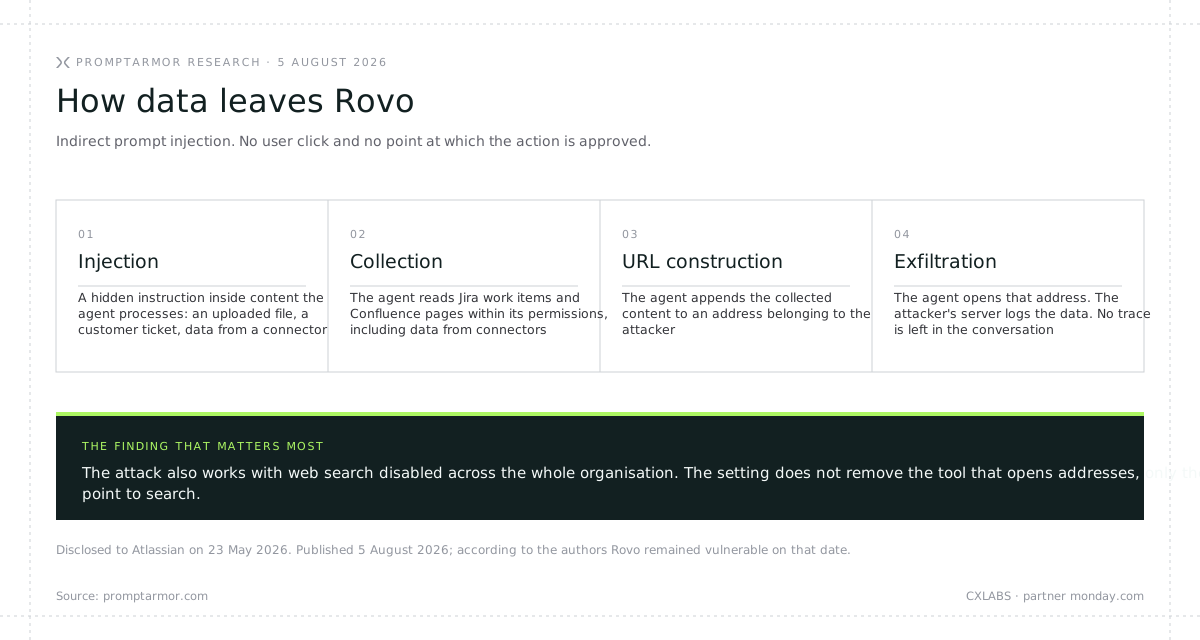
Rovo, the AI agent that operates across the Atlassian suite, is vulnerable to data exfiltration from a tenant through indirect prompt injection. With no user click and no point at which anyone approves the action.
The mechanism is simple. Rovo has a tool for opening URLs and no protection against opening a URL the agent constructed itself. All it takes is a hidden instruction inside content Rovo processes. The agent appends the contents of Jira work items and Confluence pages to an address belonging to an attacker, opens it, and the attacker's server records everything in its logs. The scope equals whatever the agent can reach, including data from connected third-party connectors.
The injection does not have to come from a file the user uploads. It can sit in a customer support ticket in Jira, in content from the web, or in data from a third-party connector. The research used a file uploaded into the conversation because that is the most ordinary scenario.
Two further details complete the picture. When the user returns to the conversation they see a normal agent response and no trace of the attack. A second, independent vector is Markdown image rendering in Rovo's output, a data exfiltration channel that has been known for years.
The detail that should trigger an alarm
The attack also works when an organisation has disabled web search for Rovo at organisation level. The setting does not remove the tool that opens addresses, only the entry point to search.
That is not an ordinary bug. It is a hole in your control evidence. An administrator opened the panel, moved the toggle, documented the decision and had every reason to believe the capability had been withdrawn. It had not. If an auditor asks on what basis you claim the agent had no web access, the answer "there was a setting" stops being enough.
For a data protection officer this means a fresh assessment, this time not of the vendor's policy but of the effectiveness of your own technical controls.
Disclosure timeline
PromptArmor disclosed the vulnerability to Atlassian on 23 May 2026. On 25 May Atlassian acknowledged it and assigned a case number. PromptArmor followed up on 4 June and 29 July. The article was published on 5 August and, according to its authors, Rovo remained vulnerable on the date of publication. As of this update we have not found a public statement from Atlassian or any information about a fix. If one appears, we will update this section.
It is also worth knowing who published it. PromptArmor sells AI vendor risk monitoring, so it is an interested party. That does not change the fact that the mechanism is described in technical, verifiable terms and published alongside the disclosure timeline.
What we are not concluding from this
Indirect prompt injection is not an Atlassian speciality. It is a class of problem affecting every platform with AI agents, and the same research team has documented equivalent cases in Microsoft Copilot, Slack AI and ChatGPT connectors. We are not claiming monday.com is inherently immune to this class of attack, and nobody serious should claim that about any AI platform.
What does change is what you should be asking a vendor.
Questions worth asking any AI vendor
Does switching a feature off withdraw the capability, or only hide the entry point? Ask for written confirmation that moving the toggle removes the tool, not the button.
What is an agent's blast radius? Does it work on its own account, with its own permissions and its own audit trail, or in the user's full context with no trace. That determines whether an incident can be contained and reconstructed.
monday.com has a concrete architectural answer to these. AI is switched off with a single toggle at account level, rather than feature by feature. Agents run on their own accounts, with their own permissions and their own trace in an item's history, so the scope of what an agent can read is bounded by permissions and its actions are identifiable after the fact. Customer data is not used to train models, regardless of plan.
What it changes in the decision
For an organisation that has to rebuild its environment before March 2029 anyway, this is one more input into the question of where, not a reason to panic. The vulnerability itself will be patched eventually. The more durable conclusion is different: if in the same environment control over data depends on your plan, and a toggle does not do what its label promises, that is not a problem with one feature. It is a problem with evidencing control, and evidencing control is what your auditor, your regulator and your customer require of you.
Source: PromptArmor, Atlassian Rovo Exfiltrates Data, Bypassing Controls, 5 August 2026.
Sources
- Atlassian, Data Center end of life schedule — dates, products in and out of scope, renewal and extended maintenance rules
- Atlassian, cloud transformation options — extended maintenance after 28 March 2029 by exception only
- Atlassian, Data contribution FAQ — default settings by plan, apps in scope, exclusions, retention, highest-active-plan mechanics
- Atlassian, data contribution settings documentation
- Atlassian, what is an Enterprise plan — entry thresholds for the plan that allows metadata opt-out
- monday.com, migrating data from Jira — trigger label procedure and transfer in batches
- monday.com, import from Jira Server — field mapping limits, no subitems, Enterprise plan, deprecation notice
- monday.com AI Trust Center and Trust Center
- monday.com, data residency documentation
- monday.com, AI agent infrastructure announcement
- monday.com, customer story: Vistra
- monday.com, customer story: Canva (Growth Marketing Creative)
- Data on script, app and custom field structure: CXLABS migration audits

Let’s talk about how CXLABS can help transform your ideas into innovative solutions, driving growth and success for your business!