Part 7 of 8: Understanding monday.com AI Products
Your team uses Claude for writing, Cursor for coding, and various AI assistants for different tasks. Each time you work with AI, you manually copy information from monday.com boards, paste context into conversations, and then manually update boards with AI-generated tasks or decisions.
The AI is helpful but isolated—it can't see your project data, doesn't know your timeline, has no context about team workload. Every interaction starts from zero, and connecting AI insights back to your work requires manual transfer.
MCP (Model Context Protocol) eliminates this gap entirely. It's an open standard that connects AI assistants directly to your monday workspace, letting AI see your boards, answer questions about your projects, and take actions—all while respecting your permissions and security.
What MCP actually is
The universal adapter for AI
MCP (Model Context Protocol) is an open standard created by Anthropic that enables AI applications to connect securely to data sources and tools. Think of it like USB-C for AI—just as USB-C provides a standardized way to connect devices, MCP provides a standardized way to connect AI applications to external systems.
What makes MCP different from traditional integrations:
Open standard: Not vendor-specific, works across AI platforms
Standardized protocol: One implementation unlocks entire ecosystem
Secure by design: OAuth authentication, permission-based access
Bidirectional: AI can read data and take actions
Before MCP, connecting an AI assistant to monday.com required custom integration work. With MCP, any MCP-compatible AI can access any MCP-enabled system—including monday.com—through a standard protocol.
How MCP changes AI integration
Before MCP:
Custom connector needed for each pairing: Claude + monday requires one integration, ChatGPT + monday requires another, Cursor + monday requires a third. This creates an "N×M problem"—N AI tools times M data sources equals countless custom integrations to build and maintain.
With MCP:
Implement MCP once in your monday workspace. Now any MCP-compatible AI assistant can connect. Implement MCP once in your AI tool. Now it can connect to any MCP-enabled data source. One protocol replaces fragmented, custom integrations.
To illustrate: if your organization uses 5 AI tools and 10 data sources, the traditional approach requires up to 50 custom integrations. With MCP, those same connections can be handled through 15 standard implementations (one per tool and one per data source). The actual numbers will vary, but the principle holds—MCP reduces integration effort from multiplicative to additive.
monday.com MCP:
monday.com provides an MCP server that gives AI assistants secure access to your workspace. Install the monday MCP app from the marketplace, connect your AI assistant through OAuth, and the AI gains ability to query boards, read items, update statuses, and create tasks—all using data from your actual workspace.
Four business problems MCP solves
1. AI isolated from your business data
Generic AI assistants operate in isolation. They know what you tell them in each conversation but have no access to your actual business data—project timelines, resource allocation, customer information, development sprints.
The isolation problem:
- You ask AI about project status, but it doesn't know your boards
- AI generates tasks you manually add to monday
- Insights require copying data from workspace into chat
- Every conversation starts without business context
MCP connects AI directly to your data sources, eliminating manual information transfer and giving AI the context it needs to provide relevant, business-specific assistance.
2. Custom integration for every tool pairing
Traditional approach requires building and maintaining a separate integration for each combination of AI tool and data source.
MCP provides a universal protocol. Build MCP support once in your data source, and it works with all MCP-compatible AI tools. Build MCP support once in your AI application, and it works with all MCP servers.
3. Limited context reduces AI effectiveness
AI assistants with access only to conversation history provide generic advice. AI with access to your actual project data, timeline constraints, and team capacity provides specific, actionable recommendations.
Context limitations show up as:
- Generic suggestions that don't fit your situation
- AI asking repeatedly for information already in your systems
- Inability to reference past decisions or historical data
- Recommendations that ignore current constraints
MCP lets AI pull context from multiple sources—your monday boards, documentation, code repositories—creating responses grounded in actual business reality.
4. Fragmented AI tool ecosystem
Different AI tools excel at different tasks, but none share context or data access. You use Claude for writing, Cursor for coding, other AI for analysis—each in isolation, requiring you to manually coordinate between them.
Fragmentation costs:
- Switching between AI tools loses context
- Copy-pasting information between systems
- Manual coordination of AI-generated work
- No unified view across AI interactions
MCP creates a connected AI ecosystem. Multiple AI tools access the same data sources through standard protocol, enabling specialized AI for each task while maintaining shared context.
How MCP works
The MCP architecture
MCP operates through three core components working together to connect AI applications with data sources.
Three core components
MCP client: The AI application
The AI tool you interact with—Claude Desktop, Cursor, Microsoft Copilot Studio, or any MCP-compatible assistant. The client manages connections to MCP servers, presents available capabilities to the AI model, and handles user permissions and approvals.
MCP Server: The data source adapter
The system exposing data and functionality—monday.com, GitHub, Google Drive, Notion, or any platform with an MCP server implementation. The server defines available tools, resources, and prompts that AI can use.
Protocol: Standard communication format
MCP defines how clients and servers communicate. Requests, responses, authentication, and capabilities all follow standardized format. This allows any client to work with any server without custom code.
How they work together
- Connection: When an MCP client starts, it connects to configured MCP servers
- Discovery: Client asks each server "What capabilities do you offer?"
- Registration: Server responds with available tools, resources, and prompts
- Availability: Client makes these capabilities available to the AI model
- Invocation: When AI needs data or action, client sends request to appropriate server
- Execution: Server processes request, accesses data, performs action
- Response: Server returns results in standardized format
- Integration: AI incorporates information into conversation and response
This entire process happens in seconds, making it appear as though the AI natively "knows" information it's actually retrieving through MCP.
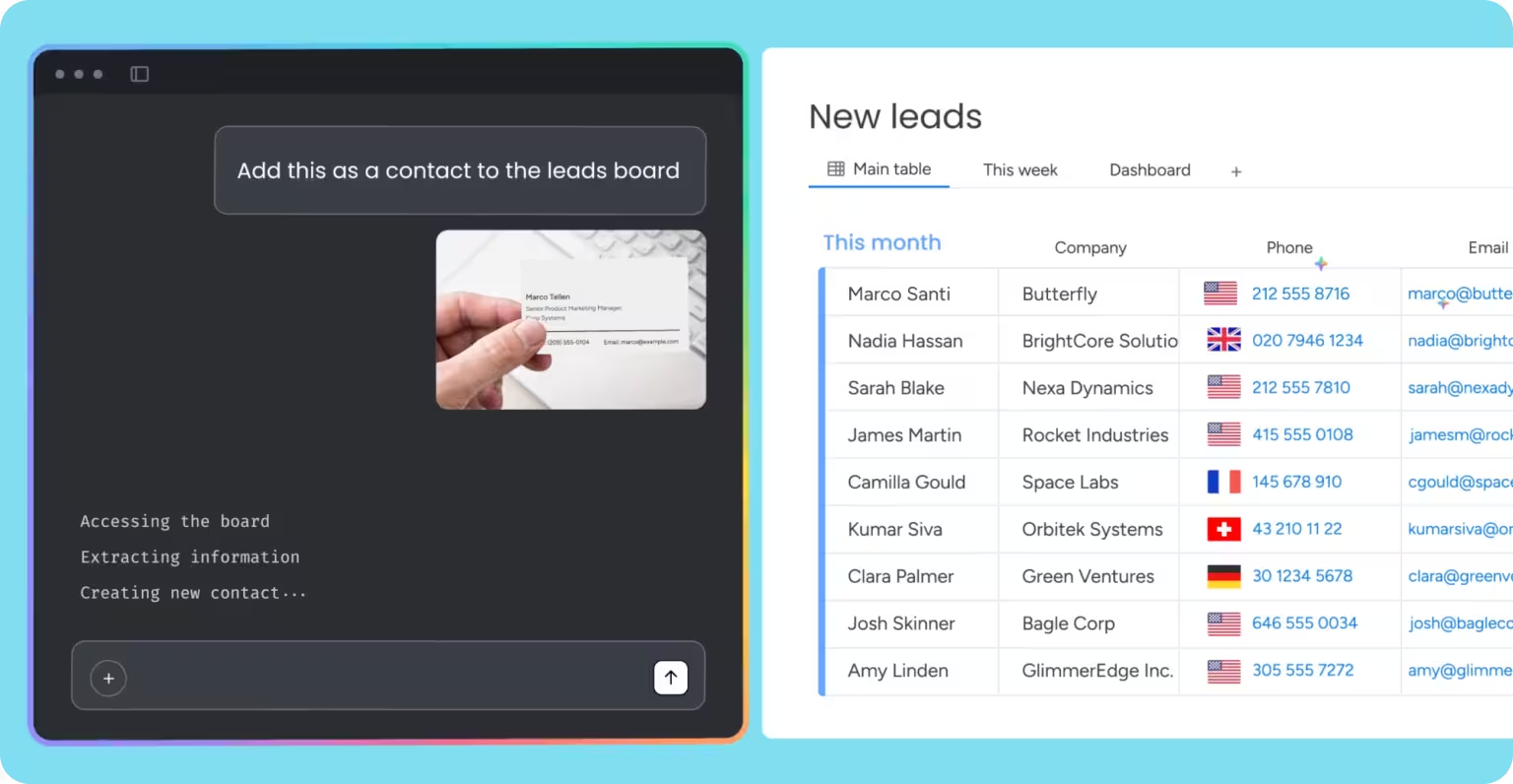
monday.com MCP implementation
What monday MCP provides
monday.com's MCP server gives AI assistants secure, permission-based access to your workspace:
Data access capabilities:
- Query boards to get project information
- Read items with all field data
- Access status, timelines, assignees
- View updates and activity history
Action capabilities:
- Create new items and sub-items
- Update item fields and statuses
- Add comments and updates
- Assign tasks to team members
Workspace intelligence:
- Sprint summaries for monday dev
- Cross-board visibility and rollups
- Project reporting and analytics
- Team performance metrics
Security and permissions:
- OAuth-based authentication
- User-level permissions enforced
- AI only accesses what you can access
- Review actions before execution
Available through MCP
When your AI assistant connects to monday MCP, it gains tools to:
Project management:
- "What's blocking the launch?" across multiple boards
- "Create tasks for Q1 planning based on last quarter's retrospective"
- "Show me all high-priority items assigned to marketing"
- "Generate sprint summary for sprint 853"
CRM workflows:
- "Create a lead for the demo request from this email"
- "Update deal stage to Negotiation for Acme Corp"
- "Show me all deals closing this quarter"
Operational workflows:
- "Create incident ticket: API gateway timeout errors"
- "Update support request status to Resolved"
- "Show me open requests by priority"
Cross-team coordination:
- "What's the status of the product launch across Product, Marketing, and Sales boards?"
- "Identify dependencies between teams for the Q2 roadmap"
The AI can execute these tasks because MCP provides standardized access to your monday workspace.
Where MCP adds value
Connected AI assistants
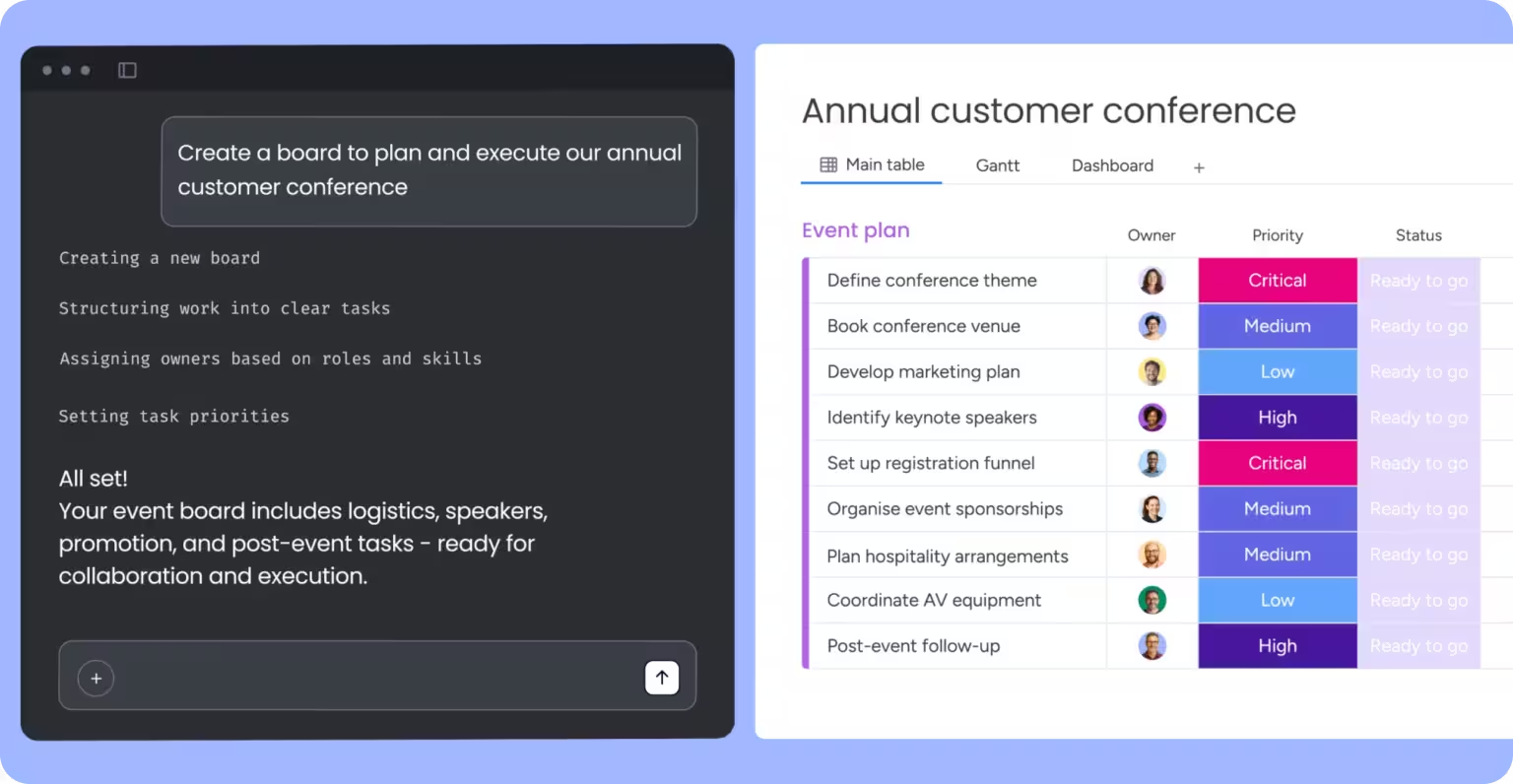
MCP transforms AI assistants from isolated chat tools into workspace-integrated intelligence.
Claude desktop with monday MCP:
- Ask about project status without leaving conversation
- Generate tasks that automatically appear in boards
- Create reports from actual workspace data
- Update item statuses through natural language
Example workflow:
You: "What's the status of the website redesign project?"
Claude (via MCP): Pulls data from your "Website Redesign" board, reviews item statuses, checks timeline, identifies blockers.
Claude: "The website redesign is 65% complete. Design phase is done. Development has 8 of 12 tasks complete. Three items are blocked waiting for API documentation from the backend team. The launch date of March 15 is at risk—you're tracking 5 days behind schedule based on current velocity."
You: "Create a task for the backend team to provide API docs by Friday."
Claude (via MCP): Creates item in Backend board, assigns to team lead, sets deadline, links to redesign project.
Claude: "Done. I've created 'Provide API documentation for website redesign' in the Backend Team board, assigned to Sarah, due Friday March 8."
This is a hypothetical example showing how a connected AI assistant could interact with your workspace data. The actual responses will depend on your board structure and project data.
This entire workflow happens through conversation, with AI accessing actual data and taking real actions in your workspace.
Development workflows
MCP connects coding AI assistants to project management, creating intelligent development workflows.
Cursor with monday dev access:
- AI understands sprint context while coding
- Automatically updates task status as work progresses
- Creates follow-up items for technical debt
- Generates sprint summaries from commit history
Example workflow:
Cursor accesses your sprint board, sees you're working on "User authentication feature," pulls acceptance criteria and technical notes. As you code, Cursor understands full context. When you complete the feature, Cursor can update item status to Ready for Review and create testing tasks—all without leaving your code editor.
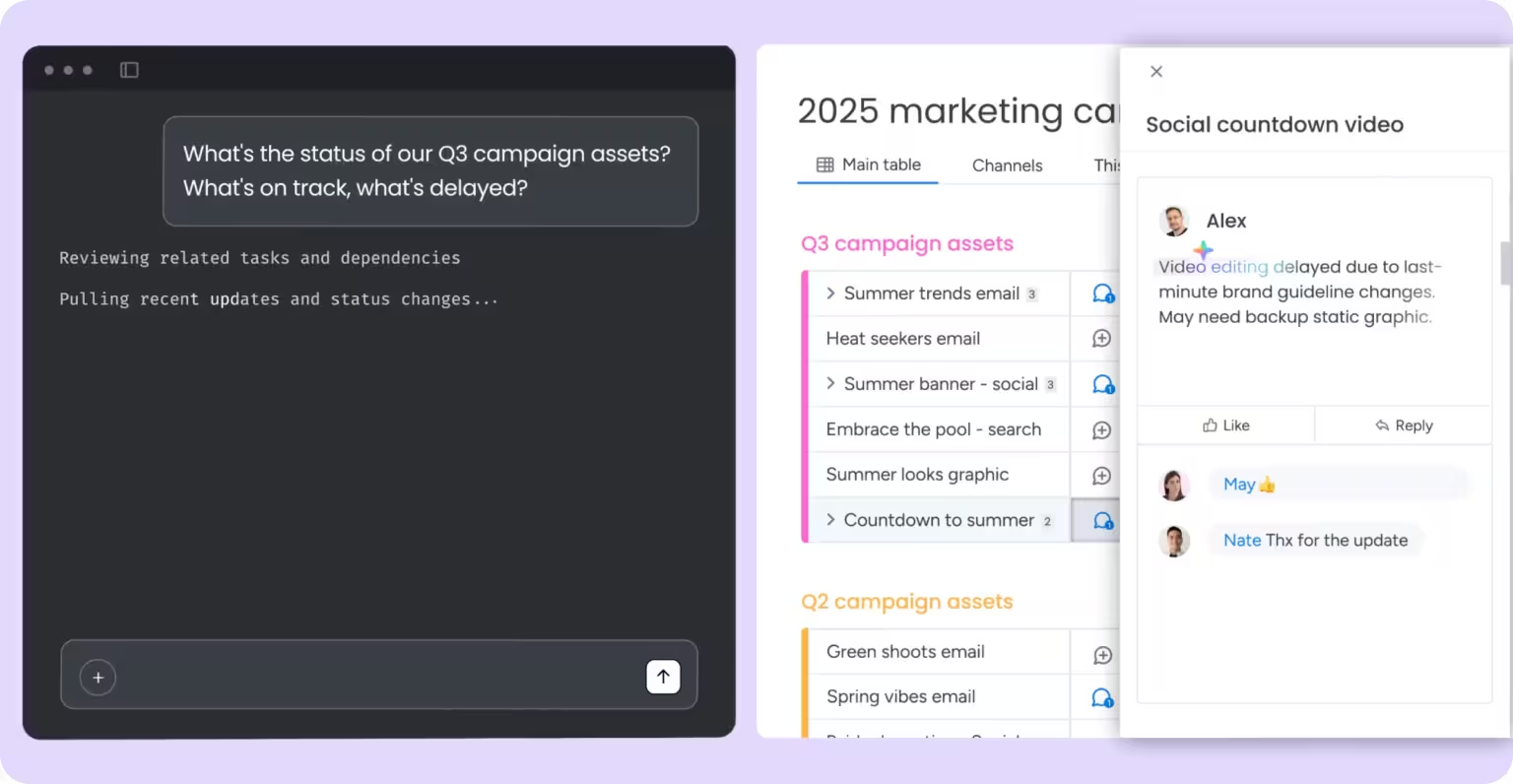
Cross-platform intelligence
MCP's real power emerges when AI connects to multiple data sources simultaneously.
Connected intelligence across tools:
- monday boards for project status
- GitHub for code context
- Google Drive for documentation
- Slack for team discussion
AI with access to all four can answer: "Why is the API integration delayed?" by checking project board status, reviewing recent commits, reading technical specs, and analyzing team discussions—synthesizing information across platforms for complete answer.
Custom AI Agents
Developers can build specialized AI agents that leverage MCP to access multiple systems and automate complex workflows.
Custom agent examples:
- Project health monitor: Checks boards daily, identifies risks, creates alerts
- Sprint planner: Analyzes velocity, suggests task allocation, balances workload
- Customer success agent: Monitors support boards, escalates issues, updates CRM
- Release coordinator: Checks development status, validates readiness, creates deployment tasks
These agents use MCP to access monday workspace programmatically, combining monday data with other sources to provide specialized intelligence.
Implementation considerations
Getting started with monday.com MCP
Step 1: Install monday MCP app
- Account admin installs from monday marketplace
- App provides MCP server for your workspace
- Available on all monday plans at no cost
Step 2: Configure your AI assistant
- Open AI tool settings (Claude Desktop, Cursor, etc.)
- Add monday MCP server connection
- Configuration varies by AI tool
Step 3: Authenticate via OAuth
- AI tool prompts for monday login
- Grant permissions for workspace access
- OAuth ensures user-level security
Step 4: Start using connected AI
- AI can now access your monday workspace
- Query boards, create items, update data
- Respects your permissions automatically
Security and permissions
MCP operates within monday.com's security model:
User-level permissions:
- AI can only access what you can access
- Your permissions determine AI capabilities
- No elevated access granted through MCP
OAuth authentication:
- Industry-standard secure authorization
- No API keys to manage or share
- Revocable access at any time
Action review:
- AI suggests actions
- You approve before execution
- Prevents unintended changes
Data privacy:
- Communication encrypted via TLS
- Data retrieved through MCP is sent to the AI provider as part of your conversation — monday.com does not review or access the content of those exchanges
- Conversations remain between you and your AI assistant
MCP-compatible AI tools
Current MCP support includes:
- Claude Desktop (Anthropic)
- Cursor (AI code editor)
- Microsoft Copilot Studio
- Windsurf
- Gemini CLI
- Any tool supporting MCP protocol
Growing ecosystem: More AI tools adding MCP support continuously. MCP is becoming industry standard for AI-to-data connections, with adoption across major AI platforms.
What to expect
Setup complexity: Configuration varies by AI tool. Claude Desktop setup is straightforward. Other tools may require more technical configuration. Documentation available for each platform.
Learning curve: Understanding what AI can access takes experimentation. Start with read-only queries. Graduate to creating items and updates. Build confidence before complex workflows.
AI suggestions require review: AI will make recommendations and suggest actions. Review before confirming changes. MCP provides capabilities; you maintain control.
Performance considerations: MCP queries add latency vs. isolated AI. Usually seconds, acceptable for most workflows. Complex queries across large boards take longer.
Questions to ask yourself
Which AI tools does our team already use?
Start with AI assistants your team knows. If you use Claude, begin with Claude Desktop + monday MCP.
What workspace data would help AI assist better?
Identify information AI frequently needs but lacks. Project status, team capacity, timeline data are common needs.
Who should have MCP access?
Consider role-based access. Project managers might benefit immediately. Developers with coding AI gain workflow efficiency.
What safeguards do we need?
Establish guidelines for AI actions. Review critical updates before execution. Define which tasks AI can handle autonomously.
How will we measure value?
Track time saved on reporting, status updates, task creation. Measure AI answer quality with access to real data vs. without.
How CXLABS can help
As a monday.com Silver Partner, CXLABS helps organizations develop MCP implementation strategy based on team workflows and AI tool usage, configure AI assistants to connect securely with monday workspace, establish governance frameworks for AI data access and action approval, and identify high-value use cases where connected AI delivers immediate productivity gains.
We ensure MCP enhances rather than complicates your team's workflow.
What's next in this series
MCP connects AI assistants to your monday workspace through an open protocol. But what if AI didn't just assist—what if it could execute entire workflows autonomously? That's where monday agents come in.
In Part 8, we'll explore how monday agents operate as specialized AI workers that handle tasks end-to-end, from analyzing data to taking action across your workspace without constant human direction.
Ready to connect AI assistants to your monday workspace through MCP? Contact CXLABS to discuss how connected AI can transform how your team works.
About this series
This is Part 7 of our 8-part series exploring monday.com AI products. We're breaking down each AI capability to help you understand how they work and how they can help your business.
Other articles in this series:
- Part 1: AI Workflows
- Part 2: AI Blocks
- Part 3: Product Power-ups
- Part 4: monday sidekick
- Part 5: monday vibe
- Part 6: AI Notetaker
- Part 7: MCP (you are here)
- Part 8: monday agents (coming soon)

Let’s talk about how CXLABS can help transform your ideas into innovative solutions, driving growth and success for your business!