Part 5 of 8: Understanding monday.com AI Products
How many times has your team needed a specific tool that doesn't quite exist? You need a dashboard showing metrics from three different boards, or a custom intake form with fields that match your actual workflow, or a tracker that visualizes data exactly how your stakeholders want to see it.
The options aren't great: wait months for IT to build it, pay for custom development, compromise with a generic tool that almost works, or cobble something together in spreadsheets that breaks when anyone touches it.
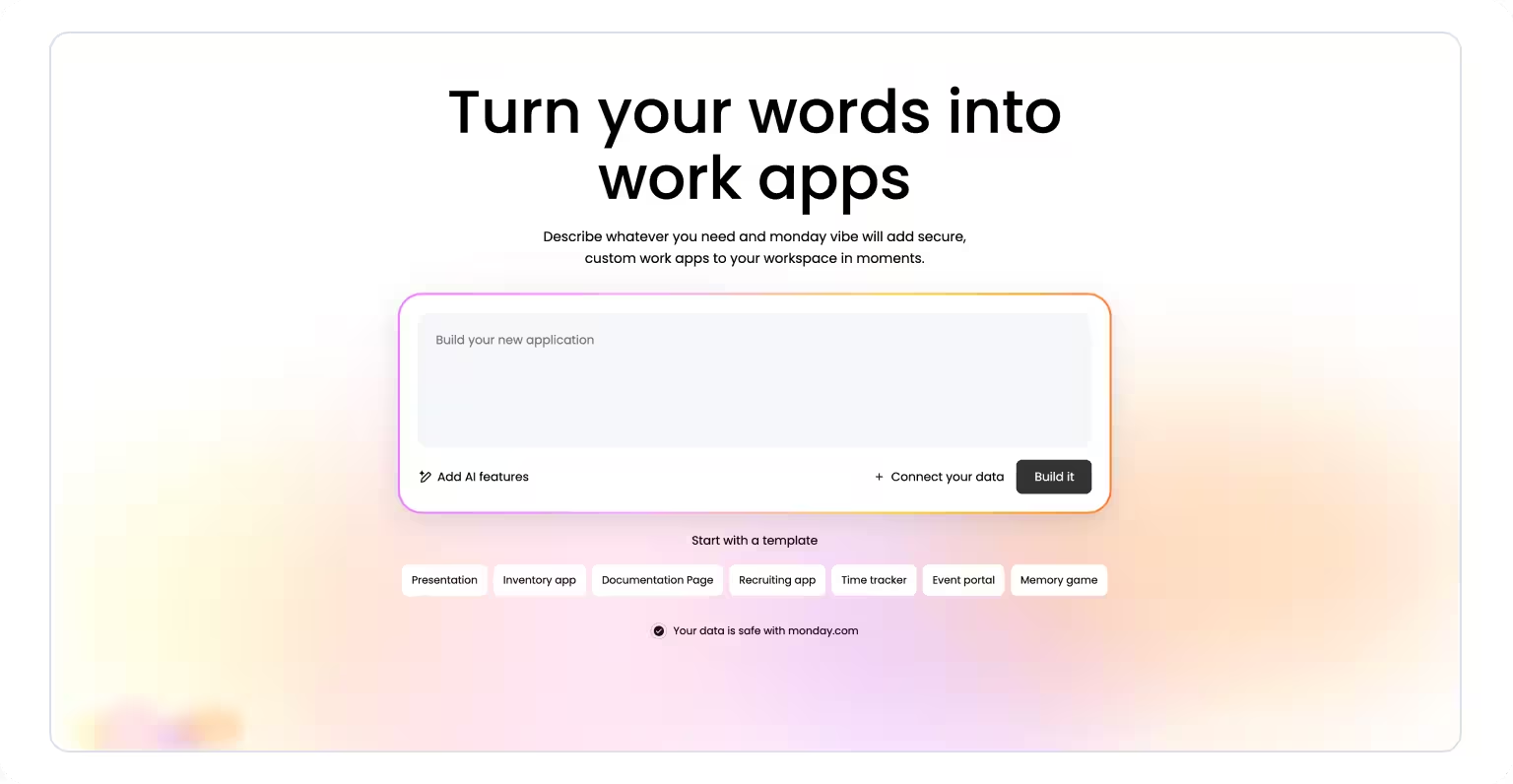
monday vibe eliminates this gap entirely. It turns natural language descriptions into working applications that run directly on monday.com. You describe what you need—"build a time tracking dashboard where employees log hours and I can see totals by project"—and vibe generates a functional app.
What monday vibe actually is
The AI App builder that works through conversation
monday vibe is an AI-powered app builder that creates custom business applications from natural language prompts. You explain what you need in plain English, and vibe generates the complete application—interface, logic, data structure, and integrations.
What makes it different from generic no-code tools:
Conversational interface: Describe outcomes, not technical specifications
monday.com integration: Apps run on your existing infrastructure with your security settings
Iterative refinement: Adjust through dialogue, not visual builders or code editors
Enterprise-grade: Inherits platform compliance, permissions, and scalability
From prompt to working app
The vibe coding approach means you operate at the business problem level. Instead of learning a no-code platform or explaining requirements to developers, you have a conversation about what needs to happen. "Marketing managers need to submit campaign requests with budget, timeline, and target audience. Show all requests in a sortable table with status."
Vibe interprets this description, generates the app, and shows you a working preview. Need changes? Continue the conversation. "Make budget required" or "Add priority dropdown" or "Send email when new request comes in." Each request refines the app without requiring you to understand code or platform mechanics.
Where apps live
Apps you build with vibe run inside monday.com, not as separate software. This means:
Your data: Apps connect to your boards (up to 5 boards per app) and work with your actual informationYour security: All permissions, compliance requirements, and governance automatically enforcedYour infrastructure: Runs on monday.com's enterprise platform, no separate hosting neededYour ecosystem: Integrates with your workflows, automations, and other monday features
You're extending your workspace, not adding another tool to manage.
The problem monday vibe solves
1. Development resource bottleneck
Most organizations have more tool needs than development capacity. Marketing needs a campaign tracker. Operations wants a custom reporting dashboard. Sales needs a proposal generator. Each request joins a backlog measured in quarters or years.
The backlog creates:
- Teams waiting months for simple internal tools
- Workarounds that become permanent technical debt
- Lost productivity as people work around missing capabilities
- Ideas abandoned because "IT will never build that"
monday vibe addresses this by enabling business teams to build what they need themselves when they can articulate requirements clearly.
2. Generic software doesn't match your process
Off-the-shelf tools force compromise. Your approval process has three stages specific to your compliance requirements. The available software supports two stages with fixed options. You either change your process (risking compliance) or maintain manual steps that defeat the purpose of automation.
Common mismatches:
- Workflow steps that don't align with how you actually work
- Required fields that don't match your data model
- Missing functionality unique to your industry or company
- Forced features that add complexity you don't need
With vibe, you describe your actual process—including the parts that make it unique—and get tools that match how you work.
3. Requirements lost in translation
The standard development process involves multiple translation steps. Business explains what they need. Project managers document requirements. Developers interpret specifications. By the time everyone sees the result, it's not quite what anyone meant.
Translation problems show up as:
- Misunderstood requirements despite detailed documentation
- Multiple revision cycles to align expectations
- Delayed feedback until development is substantially complete
- Final product that technically meets specs but misses the point
Conversational app building collapses this translation chain. You describe needs, see results immediately, refine based on what you observe. The feedback loop is seconds, not weeks.
4. Custom solutions that multiply out of control
One team builds a spreadsheet solution that works for their needs. Another team copies it and modifies for their process. Six months later, you have five versions of "the same" tool across departments. None talk to each other. Each has accumulated unique formulas and macros that only one person understands. Data silos prevent organization-wide visibility.
The scaling problem includes:
- Inconsistent versions with no central maintenance
- Knowledge locked in individual team members
- Shadow IT concerns as teams work around official tools
- Brittle solutions that break when people leave
- No governance or version control
Apps built through vibe run on monday.com infrastructure with proper permissions, can be shared across teams, and benefit from platform governance.
How monday vibe works
Understanding vibe coding
"Vibe coding" is a term coined by AI researcher Andrej Karpathy in early 2025 to describe software development through natural language conversation with AI. Instead of writing code line by line, you describe desired outcomes and let AI generate the implementation.
The fundamental shift:
Traditional development: Think in terms of technical implementation—which framework, what database structure, how to handle edge casesVibe coding: Think in terms of business outcomes—who uses this, what do they need to accomplish, what should the app do
In monday vibe, this means you describe business needs in plain language: "I need a dashboard showing project status across all active initiatives, grouped by department, with budget vs. actual spend visible." Vibe handles the translation to working software.

Four steps from idea to app
Step 1: Describe what you need
Effective descriptions include context about your specific situation:
Who will use this: "Marketing managers" or "External clients" or "Finance team"What they'll do: "Submit campaign requests" or "Track time" or "View analytics"How it should work: "Show results in table" or "Group by priority" or "Send notifications"Specific requirements: "Budget field required" or "Auto-assign based on category"
Example prompt:"Build a project intake dashboard where marketing managers submit campaign requests. Include fields for campaign name, budget, timeline, and target audience. Display all requests in a sortable table with status indicators (New, In Review, Approved, Rejected). Send email notification to approvers when new request arrives."
You're having a business conversation, not writing technical specs. You can also use the speech-to-text feature to dictate your description instead of typing it.
Step 2: AI Generates the application
monday vibe interprets your description and creates:
User interface: Forms, tables, dashboards, buttons based on what you describedData structure: Fields and relationships to store information properlyBusiness logic: Rules, calculations, validations that make the app workIntegrations: Connections to boards, automations, notifications
The app appears in preview mode, built using monday.com's UI component library, ensuring visual consistency with the platform. Behind the scenes, vibe sets up proper permissions, data relationships, and responsive design automatically.
Step 3: Refine through conversation
The preview reveals what works and what needs adjustment. Continue the dialogue:
"Make the budget field required and add validation for minimum values""Change the status dropdown to include 'On Hold' option""Filter the table to show only requests from past 90 days by default""Add a chart showing request volume by month"
Each request updates the app in seconds. You're operating at the functional level—describing what should change in terms of what the app does—without seeing or understanding the underlying code.
This iterative approach means you don't need perfect requirements upfront. Build, observe, refine—with immediate turnaround instead of waiting for development cycles.
You can also use the Discuss feature to brainstorm improvements or troubleshoot issues before committing to changes—separating exploration from building.
Step 4: Publish and share
When the app meets your needs, publish it to make it available to others.
Publishing workflow:
- Click Publish in the app builder
- App becomes visible to users based on permissions
- Enterprise accounts control who has publishing rights (enabled for admins by default, closed to other roles by default)
- Governance policies apply to custom app development
Permission structure:
- By default, admins can publish apps
- Other users create private apps (visible only to themselves) unless granted publishing permissions
- Admins grant publishing permissions to specific roles if desired
Important: monday vibe is a paid add-on, charged per number of published apps on your account. Building and testing apps in draft mode is free—you only pay when you publish. Pricing starts at $100/month for 10 published apps, with higher tiers available as you scale.
Published apps run on monday.com's production infrastructure with the same security, compliance, and performance guarantees as any other platform feature. This isn't a prototype—it's production software.

What's happening technically
Enterprise infrastructure
Apps inherit monday.com enterprise capabilities:
- Platform security and data encryption
- Compliance certifications (SOC 2, GDPR, etc.)
- Automatic responsive design across devices, including mobile
- Scalability and performance management
- Backup and disaster recovery
AI credit consumption
When your app uses AI capabilities (such as AI-generated content, web search, or natural language processing), it consumes 8 AI credits per action.
Examples of actions that consume 8 credits:
- Each board item update (8 credits per individual update, regardless of whether multiple updates are made on the same item)
- Web search operations
- Natural language processing
- Data analysis or transformation
- AI-generated content
However, there are important nuances. When a vibe app triggers an integration, it consumes 2 AI credits per integration trigger—not 8. And for AI blocks used outside of vibe, multiple AI actions on the same item within a 24-hour period count as a single charge of 8 credits.
Simple form apps that don't use AI features consume no credits. Apps with complex logic, AI analysis, or web search consume more. You can ask vibe directly: "How many credits will this app use?"
AI credits cost $0.01 each. Paying accounts receive a one-time free trial of 6,000 credits (12,000 for Enterprise plans). Additional credits can be purchased.
Integration capabilities
Apps can connect to services through monday.com's authentication system:
- Email platforms (Gmail, Outlook)
- Common SaaS tools with monday integrations
- Custom APIs where monday supports them
Once connected, your app incorporates these integrations into its logic—sending emails, updating external systems, pulling data from connected services.
Current limitations to be aware of
A few practical constraints worth knowing:
- Apps can connect to up to 5 boards. Board connections can only be established in the first prompt—you can't add boards to an existing app later.
- Only the app's creator can edit it. Other users can use published apps but cannot modify them.
- monday vibe is not yet available on the desktop app.
- Vibe apps are gradually being rolled out in the left panel navigation.
Where monday vibe adds value
Custom operational dashboards
When your work spans multiple boards but you need consolidated visibility, vibe creates dashboards that show exactly what you need.
Dashboard applications:
- Executive view: Budget status from finance boards + delivery timelines from project boards + risk indicators from operations
- Team lead view: Task progress by team member + resource allocation + upcoming deadlines
- Stakeholder view: Project milestones + deliverable status + budget burn rate
The value is getting metrics from across your workspace in one view, configured specifically for each audience.
Specialized data collection
Standard monday forms work for standard needs. When your intake process has unique requirements, vibe builds collection tools that match your exact workflow.
Custom form scenarios:
- Conditional fields that show/hide based on previous selections
- Validation rules specific to your business (budget ranges, date constraints)
- Automatic routing to appropriate boards based on form content
- Integration triggers that fire when specific criteria are met
Example: A service request form where selecting "Technical Issue" reveals technical details fields and routes to IT board, while "Content Request" shows content brief fields and routes to marketing board.
Role-specific interfaces
The same underlying work data needs different views for different roles. Vibe creates interfaces optimized for each user's needs without duplicating data.
Role-specific applications:
- Project managers see Gantt views with dependencies and critical path
- Developers see task lists filtered to their assignments with technical details
- Clients see progress updates and deliverable status without internal details
- Finance sees cost tracking and budget compliance
Each role gets exactly the information they need in the format that makes sense for them.
Custom reporting and analysis
When standard reports don't answer your specific questions, vibe builds analysis tools that do.
Reporting applications:
- Transform data for different audiences (technical details for operations, summaries for leadership)
- Calculate metrics unique to your business model
- Generate scheduled reports automatically (weekly project status, monthly budget review)
- Create interactive analysis tools where stakeholders can filter and explore
The value is getting answers to your actual questions, not forcing questions to fit available reports.
AI-enhanced apps
You can extend your vibe apps further by instructing them to use AI capabilities or web search. This opens up use cases like:
- A chatbot that generates answers based on provided knowledge materials
- A competitor analysis app that searches data online and creates battle cards
Simply tell vibe in the chat to "use AI" or "search the web" to incorporate these features. Keep in mind that AI-enhanced actions consume credits as described above.
.avif)
What to consider before building with monday vibe
When vibe makes sense
monday vibe works best when you can clearly articulate what you need. If you can describe your requirements in conversation, you can probably build it in monday vibe.
Good fit scenarios:
- Requirements are specific and articulable
- Work data already lives in monday.com boards
- You need solutions faster than traditional development allows
- Off-the-shelf tools don't match your process
- Iterative refinement is acceptable
Challenging scenarios:
- Requirements are exploratory or unclear (though rapid prototyping can help)
- Heavy integration with many external systems
- Applications operating entirely outside monday ecosystem
- Extremely complex logic requiring traditional development
- Apps that need data from more than 5 boards
Technical requirements
Account needs:
- Paying monday.com account (free accounts cannot create vibe apps; trial accounts can build but cannot publish)
- Appropriate permissions (admins can publish by default)
- Well-structured boards for apps that pull from multiple data sources
- monday vibe paid add-on for publishing apps
Permission considerations:
- Anyone can create private apps for personal use
- Publishing requires admin permission (configurable for enterprise accounts)
- Published apps inherit monday.com's permission system
- Members and guests can view published vibe apps as long as they have access to the underlying boards
Resource planning:
- Budget AI credits based on app complexity
- Simple forms without AI features use no credits
- Apps with AI processing, web search, or complex analysis consume more
- Consider credit allocation across team app building
- Factor in the vibe add-on cost based on how many apps you plan to publish
Realistic expectations
Prompt writing has a learning curve
Your first descriptions will likely be too vague or miss important context. This is normal—you're learning to communicate requirements effectively.
Early prompts often:
- Lack specificity: "Build a project tracker" (too general)
- Assume context: Not explaining who uses it or why
- Focus on features instead of outcomes
Effective prompts:
- Explain the user and their goal
- Describe what success looks like
- Include relevant constraints or requirements
- Give examples where helpful
Iterative refinement is expected
The conversational interface makes changes easy but doesn't eliminate the need for clear thinking about business needs.
What this means:
- First attempt typically gets you 70-80% of the way
- Refinements dial in remaining details through iteration
- You discover what works by seeing and using the app
- Requirements often clarify through the building process
Integration has limits
Integration capabilities depend on what monday.com supports and what external services allow.
Works well:
- Standard monday integrations (email, common SaaS platforms)
- Services with open APIs and monday connectors
- Authentication through monday's standard process
May need traditional development:
- Highly custom integrations
- Legacy systems without modern APIs
- Complex data transformations between systems
- Real-time sync requirements
Apps need ongoing maintenance
Like any software, vibe apps require maintenance as needs evolve. And because only the original creator can currently edit a vibe app, ownership planning is especially important.
Maintenance considerations:
- Who owns the app, and what happens if they leave the organization?
- How do you document what the app does and why decisions were made?
- How do you test changes before publishing updates?
- What governance process exists for modifications?
- Since only the creator can edit, how do you ensure continuity?
Establish these answers before apps become business-critical.
Performance with large datasets
Apps connected to boards with many items may experience slow loading times. monday.com recommends several optimization strategies: using the aggregation API for statistics, loading only necessary data, limiting date ranges, and querying fewer columns. You can also ask vibe directly to help optimize performance.
Questions to ask yourself
Can we clearly describe what we need?
If yes: vibe can likely build itIf no: use vibe for rapid prototyping to clarify requirements through iteration
Is this a good fit for monday.com data?
Apps work best when operating on data already in your boards (up to 5 boards per app). Multiple external data sources may indicate you need a different platform.
Do we need integrations beyond monday.com's standard capabilities?
Standard integrations (email, common tools) work well. Unusual or highly custom integrations may require traditional development.
Will we maintain this application long-term?
One-off solutions for temporary needs are fine. Permanent tools need maintenance plans, documentation, and clear ownership—especially given that only the creator can edit.
Who owns this app and its evolution?
Individual ownership creates knowledge silos and risk when people leave. Team ownership with documentation ensures continuity. Establish governance before apps multiply across the organization.
How CXLABS can help
As a monday.com Silver Partner, CXLABS helps organizations determine where vibe apps create value versus where traditional development remains appropriate, develop effective prompting strategies that generate high-quality apps with fewer iterations, design integration architecture that connects vibe apps with broader technology ecosystems, and establish governance frameworks for who builds what, how apps are maintained, and how custom development scales responsibly.
We ensure vibe becomes a strategic capability rather than creating new technical debt.
What's next in this series
monday vibe transforms business needs into custom applications through conversation. But what about transforming your meeting conversations into actionable work? That's where AI Notetaker comes in.
In Part 6, we'll explore how AI Notetaker joins your meetings, captures everything discussed, generates summaries, identifies action items, and creates tasks on your monday boards—all automatically.
Ready to explore how vibe apps can fill gaps in your workflow without development backlogs? Contact CXLABS to discuss which custom tools would create the most value for your team.
About this series
This is Part 5 of our 8-part series exploring monday.com AI products. We're breaking down each AI capability to help you understand how they work and how they can help your business.
Other articles in this series:
- Part 1: AI Workflows
- Part 2: AI Blocks
- Part 3: Product Power-ups
- Part 4: monday sidekick
- Part 5: monday vibe (you are here)
- Part 6: AI Notetaker (coming soon)
- Part 7: MCP (coming soon)
- Part 8: monday agents (coming soon)

Let’s talk about how CXLABS can help transform your ideas into innovative solutions, driving growth and success for your business!