Part 4 of 8: Understanding monday.com AI Products
Most AI chatbots are helpful conversationalists—they answer questions, draft content, explain concepts. But when you close the chat window, you still need to do the actual work. Copy the answer. Update the board. Send the notification. Create the tasks.
monday sidekick takes a fundamentally different approach. It doesn't just talk about what should happen—it actually makes it happen, right in your workspace, with full access to your work data.
In Part 1, we explored AI Workflows that orchestrate autonomous processes. In Part 2, we examined AI Blocks that power intelligent actions. monday sidekick brings these capabilities together through natural conversation, acting as your context-aware AI assistant that reads your workspace data and executes work on your behalf.
What monday sidekick actually is
Beyond generic chatbots
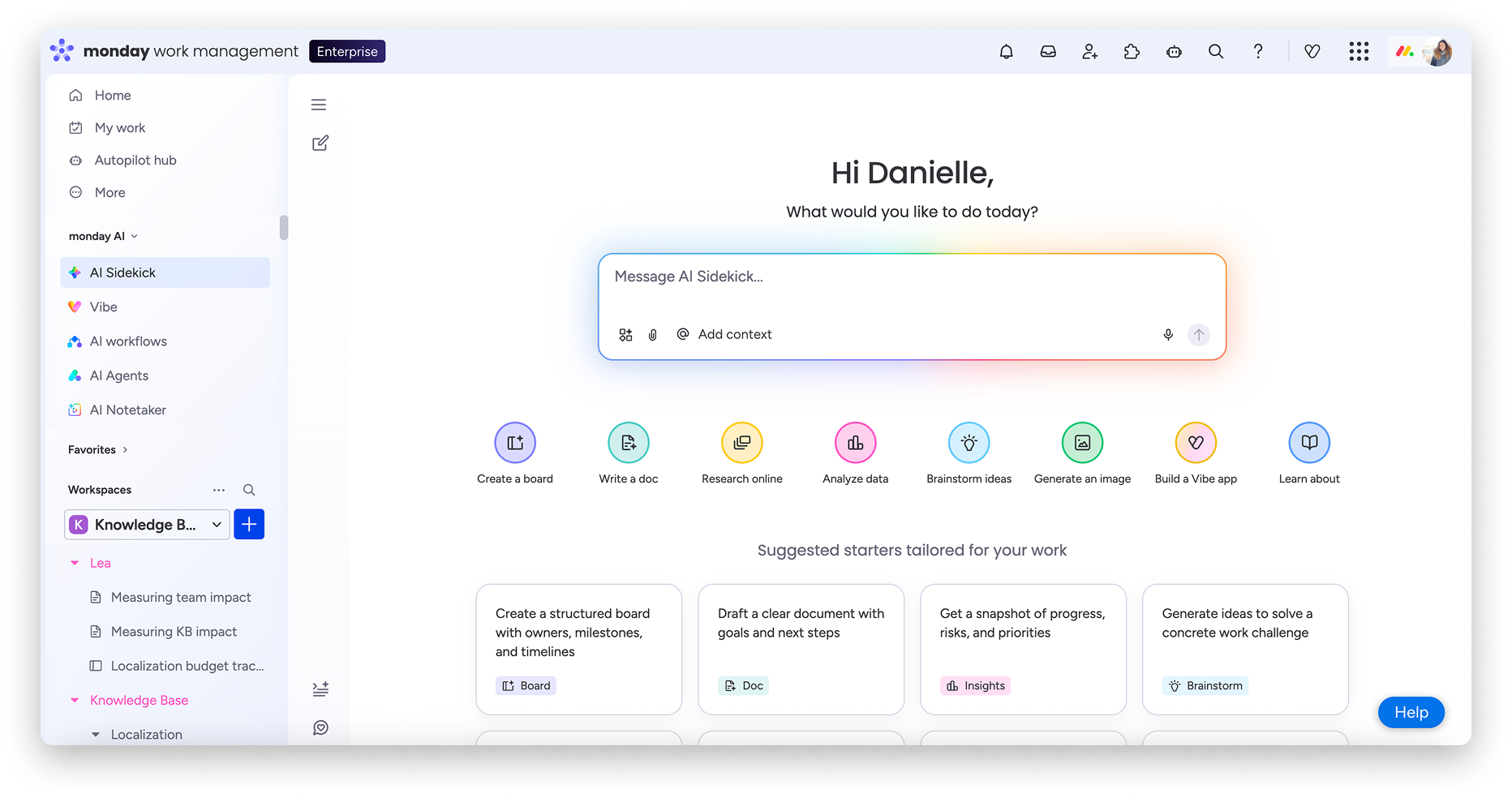
monday sidekick is an intelligent AI assistant built directly into monday.com that combines leading AI models with deep access to your workspace, boards, and business processes. It's not a separate tool you switch to—it's embedded everywhere you work.
The key differentiators:
Context-aware: monday sidekick knows which board you're viewing, what projects you're managing, who your team members are, and what's currently happening in your workspace
Action-capable: It doesn't just suggest what to do—it creates items, updates statuses, generates reports, and triggers workflows
Conversationally driven: You interact through natural language, not rigid commands or complex interfaces
Continuously available: Access it at the account level, board level, or item level—wherever you need assistance. Note that sidekick works within a single workspace at a time, so it interacts with boards and assets from the workspace you're currently in.
The digital worker concept
Think of monday sidekick less as a chatbot and more as a digital team member who:
- Has access to your current work state across boards and docs
- Suggests relevant actions based on board activity
- Executes routine tasks that consume your time
- Surfaces insights you might miss in day-to-day operations
The problem monday sidekick solves
1. Switching between multiple AI tools
Modern knowledge workers juggle numerous AI tools. ChatGPT for drafting. Perplexity for research. Claude for analysis. Each conversation starts from zero context—you need to explain what you're working on, provide background, and then manually transfer any outputs back into your work systems.
monday sidekick eliminates tool switching. Everything happens in the platform where your work already lives, with the AI already having access to your workspace data.
2. Lack of business context in generic AI
Generic AI chatbots are powerful but don't know your business. They can't tell you which projects are at risk, what tasks are overdue, or who should be assigned to incoming work. You need to provide all this context every time you ask for help.
monday sidekick has complete workspace visibility:
- Current project statuses
- Team member workloads
- Board structures and workflows
- Recent activity and updates
- Organizational priorities
3. Manual coordination and status updates
Teams spend enormous time on coordination work:
- "What's the status of the marketing campaign?"
- "Can someone create tasks for next quarter's initiatives?"
- "Who should review this deliverable?"
- "What are the biggest risks across our portfolio?"
Each question requires gathering information, synthesizing it, and communicating results.
4. Information scattered across platforms
Work context lives in boards, updates, docs, conversations, and attached files. Finding relevant information means searching multiple locations, reading through threads, and piecing together the current state.
monday sidekick aggregates and analyzes across your workspace, surfacing insights from these sources in response to natural questions.
Where monday sidekick adds value
Executive oversight: When leaders need quick summaries across multiple initiatives without drilling into each board
Project coordination: When managers juggle numerous projects and need rapid status checks or proactive risk identification
Team efficiency: When repetitive board maintenance tasks consume time better spent on strategic work
Process execution: When standard workflows need triggering but require gathering context first
How monday sidekick works
Context awareness explained
When you open monday sidekick, it already has access to:
Your workspace structure:
- Which boards exist and their purposes
- How boards connect to each other
- Standard workflows and processes
- Team member roles and responsibilities
Current work state:
- Items in progress, completed, or blocked
- Upcoming deadlines and overdue tasks
- Recent updates and changes
- Data that may indicate potential issues
Your specific context:
- Which board you're viewing
- Which item you selected
- Your previous interactions with monday sidekick
- Your role and permissions
This contextual foundation means you can ask "What's at risk this week?" and get specific, relevant answers without explaining what "this week" means for your projects or what "risk" looks like in your context.
Natural conversation interface
monday sidekick uses conversational AI to understand intent expressed in plain language. You don't need to learn commands or follow rigid syntax.
Examples of natural requests:
"Show me all high-priority items assigned to marketing team"
"Create a project brief for the Q2 launch based on the strategy doc"
"What tasks are blocking the homepage redesign?"
"Flag items that haven't been updated in two weeks"
The AI interprets these requests, determines what actions to take, and executes them—all through simple conversation.
Action capabilities
Unlike chatbots that stop at suggestions, monday sidekick performs actual work:
Board management:
- Create new items with appropriate fields populated
- Update statuses, assignments, dates
- Move items between groups or boards
- Archive completed work
Information synthesis:
- Generate executive summaries of board status
- Identify overdue or blocked items across projects
- Extract insights from updates and docs
- Flag potential issues based on workspace data
Process triggering:
- Initiate workflows based on current context
- Assign work to relevant team members
- Send notifications with relevant context
- Update multiple boards simultaneously
Content creation:
- Draft project briefs from existing information
- Generate meeting agendas based on board data
- Create status reports for stakeholders
- Produce documentation from work items

Integration with AI ecosystem
monday sidekick doesn't work in isolation—it leverages the entire monday.com AI stack:
AI Workflows: Can trigger and monitor autonomous workflows on your behalf
AI Blocks: Uses all available AI actions (summarize, classify, generate, analyze) in its responses
AI-powered columns: Can populate or update AI-enhanced data throughout boards
This integration means monday sidekick has access to the full range of AI capabilities, applying them contextually based on your needs.
Different access points
Account-level: Access monday sidekick from anywhere for cross-board insights and actions
Board-level: Open monday sidekick on specific boards for focused assistance with that workspace
Item-level: Use monday sidekick on individual items or batches (up to 10) for targeted task management
The conversation maintains context as you move between levels, carrying the most recent message forward.

Mobile access
monday sidekick is also available as a dedicated mobile app for iOS and Android, separate from the main monday.com mobile app. It offers the same capabilities as sidekick on the web and stays fully synced with your workspace, so you can ask questions, take actions, and continue conversations on the go. Any skills you've connected on the web — such as Gmail, Slack, Outlook, or Google Calendar — work in the mobile app as well. Your usage limits apply across both web and mobile, drawing from the same daily message allowance.
Potential use cases
Board insights and analysis
The scenario: You're preparing for a steering committee meeting and need a quick overview of portfolio health.
What monday sidekick does:
- Analyzes all active projects across relevant boards
- Identifies items at risk (overdue, unassigned, blocked)
- Highlights accomplishments and progress
- Surfaces upcoming milestones
- Generates an executive summary
Result: Rapid preparation instead of lengthy manual review.
Task creation and management
The scenario: New client just signed. You need to kick off the standard onboarding workflow.
What monday sidekick does:
- References your onboarding template
- Creates all tasks on the appropriate board
- Assigns to relevant team members
- Sets deadlines according to your standard timeline
- Notifies relevant stakeholders
Result: Complete onboarding structure in moments, not the extended manual setup typically required.
Report generation
The scenario: Leadership wants a status report on the product development pipeline.
What monday sidekick does:
- Gathers data from dev boards
- Analyzes completion rates and velocity
- Identifies bottlenecks or delayed items
- Summarizes recent accomplishments
- Formats into coherent narrative
Result: Professional report ready for distribution without lengthy data compilation.
Process coordination
The scenario: Marketing campaign needs review from legal, creative, and product teams.
What monday sidekick does:
- Identifies relevant reviewers from the workspace
- Creates review tasks for each stakeholder
- Sets review deadlines appropriate to campaign launch
- Includes relevant context and materials
- Establishes approval workflow
Result: Coordinated review process initiated without sending emails or hunting down stakeholders.
What to consider before using monday sidekick
Board structure importance
monday sidekick effectiveness depends on well-organized workspaces. Clear board structures, consistent naming conventions, and logical workflows enable better AI processing and more accurate actions.
Before heavily relying on monday sidekick:
- Review board organization
- Standardize column types and names
- Document key workflows
- Ensure data quality
Training team on natural language
While conversational AI is intuitive, teams benefit from understanding how to interact effectively:
Good practices:
- Be specific about what you want accomplished
- Reference boards or items by name when needed
- Provide context for unusual requests
- Review AI-generated outputs before finalizing
Understanding limitations
monday sidekick is powerful but not infallible. It's still a relatively new product that monday.com continues to improve:
- Outputs require verification before critical actions
- Complex decisions still need human judgment
- Novel scenarios may require more guidance
- Strategic choices shouldn't be fully delegated
- Results may occasionally be incorrect or unexpected
Treat monday sidekick as a capable assistant, not a replacement for thoughtful leadership.
Privacy and permissions
monday sidekick operates within your monday.com permissions structure. It can only access boards and take actions that align with user permissions.
Administrative considerations:
- Decide who can enable monday sidekick actions
- Establish guidelines for AI assistance
- Monitor usage for compliance
- Review audit logs when needed
Starting approach
Begin with low-stakes, high-volume tasks:
- Status summaries and reporting
- Routine task creation
- Board organization and cleanup
- Information retrieval and synthesis
- Standard process initiation
As your team builds confidence and understands capabilities, expand to more complex scenarios.
How CXLABS can help
As a monday.com Silver Partner, CXLABS helps organizations optimize their monday.com workspaces to maximize monday sidekick effectiveness. We assess board structures, identify high-value use cases, train teams on effective interaction patterns, and establish governance frameworks for AI assistance.
Our focus is ensuring your workspace is monday sidekick-ready—organized, logical, and structured to enable intelligent automation.
What's next in this series
monday sidekick helps you work faster by accessing your workspace data and acting on your requests through natural conversation. But what if you could turn a business need into a complete custom application just by describing it? That's where monday vibe comes in.
In Part 5, we'll explore how monday vibe AI app builder turns natural language descriptions into fully functional monday.com apps in minutes—no coding required.
Ready to bring intelligent assistance to your workspace with monday sidekick? Contact CXLABS to discuss how we can help you optimize your monday.com environment for AI-powered productivity.
About this series
This is Part 4 of our 8-part series exploring monday.com AI products. We're breaking down each AI capability to help you understand how they work and how they can help your business.
Other articles in this series:
- Part 1: AI Workflows
- Part 2: AI Blocks
- Part 3: Product Power-ups
- Part 4: monday sidekick (you are here)
- Part 5: monday vibe (coming soon)
- Part 6: AI Notetaker (coming soon)
- Part 7: MCP (coming soon)
- Part 8: monday agents (coming soon)

Let’s talk about how CXLABS can help transform your ideas into innovative solutions, driving growth and success for your business!